

Model displayed using our 3D Model Viewer.
By Mike Edmonston | Plugin Nexus & Point2Solid Studio
What started as a simple idea to make my own 3D scanning life easier has turned into a rather interesting software development adventure!
It all started with a 3D scanner…
A little while ago, I purchased a Creality Raptor Pro handheld 3D scanner. I’ve always enjoyed making things, experimenting with technology and finding ways to make complicated jobs a bit easier.
The scanner is a fantastic piece of equipment, and I was soon happily scanning all sorts of objects and components.
However, it wasn’t long before I discovered a problem.
Scanning an object and producing an STL or PLY file is one thing. Turning that scan into something genuinely useful in a CAD application, such as Autodesk Fusion 360 or SolidWorks, is quite another!
I wanted to take a scanned object, align it properly, establish an accurate origin and then use the geometry in CAD to modify parts, create new features or reverse engineer components.
Surely there must be a straightforward way to do that?
Well, I certainly couldn’t find an easy one!

A few YouTube videos later…
I started searching YouTube for tutorials on converting STL and PLY scans into usable CAD geometry.
There are some excellent tutorials out there, but I quickly discovered that reverse engineering a scanned object can involve an awful lot of work.
Creating sketches, aligning work planes, extracting profiles, recreating surfaces, rebuilding curved features and carefully positioning everything takes patience, experience and a considerable amount of time.
One particular video caught my attention.
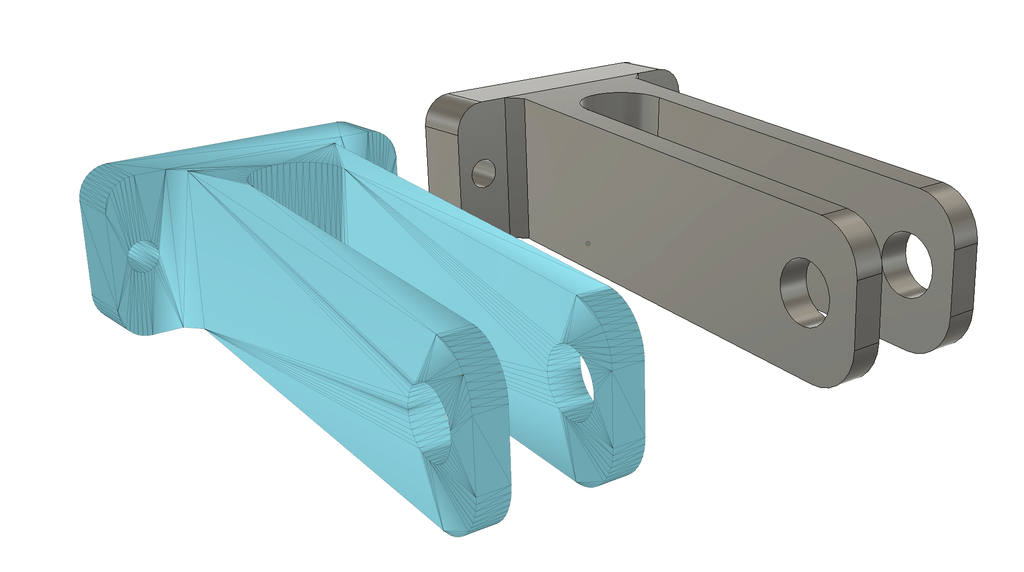
The presenter was reverse engineering a fork-shaped mechanical component. The interesting thing about this model was that several of its faces were angled, rather than being parallel or perpendicular to the normal CAD work planes.
Reconstructing the component involved creating reference geometry, identifying the angles, building sketches and gradually recreating the model.
It was an impressive demonstration, but it also looked like a considerable amount of work.
And that got me thinking…
Could I write a little application that would do most of this for me?
After all, I enjoy programming and solving problems, so why not give it a go?
And that is how Point2Solid Studio was born.
What started as a little utility has grown rather quickly!
My original idea was fairly modest.
I wanted to import an STL or PLY file, identify the important geometry, align the model and produce a STEP file that I could open in CAD.
Simple enough in theory!
Of course, as anyone who has developed software will appreciate, there’s often a rather large difference between what sounds straightforward and what actually happens when you start writing the code.
There have been plenty of experiments, failed approaches, unexpected results, enormous STEP files, geometry that didn’t quite fit and more than a few occasions when I wondered why something that looked so simple was proving so difficult!
But progress has been surprisingly good.
Point2Solid Studio is now a substantial Python-based Windows application with a growing collection of tools specifically aimed at making 3D scanning, alignment and reverse engineering easier.
And, most importantly, it can already do some pretty useful things.
So, what can Point2Solid Studio actually do?
Here are some of the main features we’ve developed so far.
1. Import and inspect 3D scans
Load scanned models in common formats, including STL and PLY, and inspect them in an interactive 3D viewer.
You can rotate, zoom and examine the model before carrying out alignment or conversion operations.
The aim is to make working with scanned geometry as straightforward as possible.
2. Automatically recognise engineering geometry
One of the more interesting features is the software’s ability to analyse a scanned mesh and identify useful engineering geometry.
This includes:
- Flat and planar surfaces.
- Cylindrical surfaces and bores.
- Circular features, radii and curved regions.
- Edges and other geometric references.
- Features that can be used to establish engineering datums.
Instead of treating everything as thousands of tiny triangles, Point2Solid Studio attempts to recognise the underlying shapes that make up the original component.
3. Establish alignment, work planes and origins
This was one of the main reasons I started the project.
When you scan a component, it doesn’t necessarily end up conveniently aligned with the X, Y and Z axes.
Point2Solid Studio allows you to identify suitable reference geometry, establish a datum and choose where the origin should be.
The software can then align the model to those engineering references before exporting it.
That means your converted model can arrive in CAD already positioned in a sensible orientation, rather than needing to be moved and rotated manually.
4. Convert STL and PLY scans into BRep STEP geometry
This is probably my favourite feature so far!
Point2Solid Studio can take suitable scan-derived geometry and reconstruct it as a genuine Boundary Representation (BRep) STEP model.
This is an important distinction.
Simply saving a triangular mesh inside a STEP container doesn’t magically turn it into useful CAD geometry.
Point2Solid Studio goes further by reconstructing faces, surfaces and solid geometry that CAD applications can work with.
The resulting STEP file can be opened in applications such as Fusion 360, SolidWorks and other CAD packages supporting STEP.
Although this is not a fully parametric feature-history model, it can provide a usable solid body.
Once imported into CAD, you can carry out familiar operations such as:
- Adding sketches directly to suitable faces.
- Extruding new geometry.
- Cutting holes and pockets.
- Performing Boolean operations.
- Joining or subtracting bodies.
- Adding new features and modifying the existing solid.
In other words, you can start working with the scanned component as CAD geometry rather than simply looking at a mesh.
5. Framework and cross-section profile tools
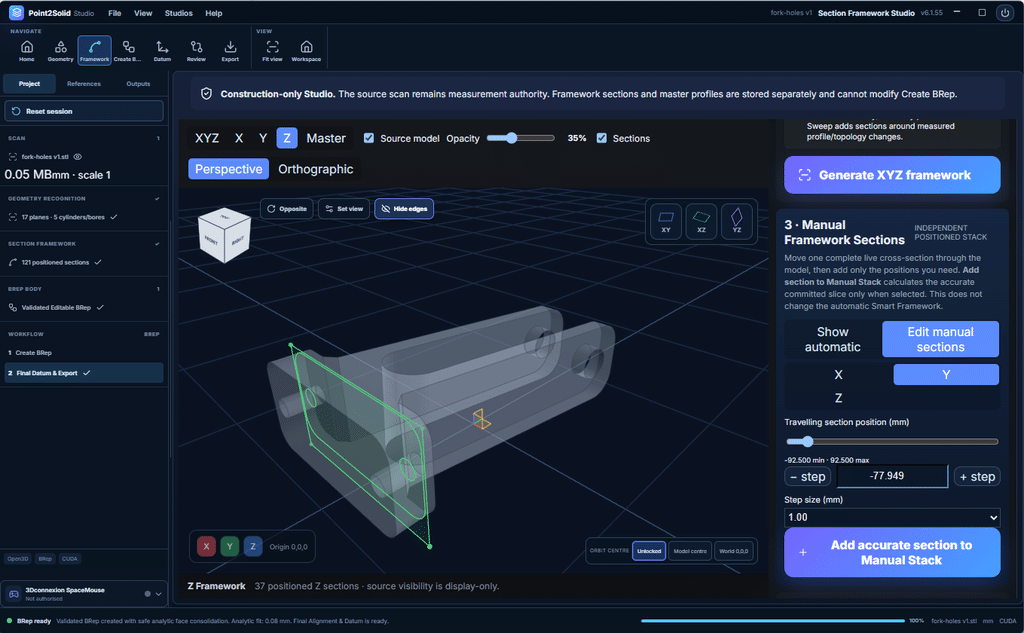
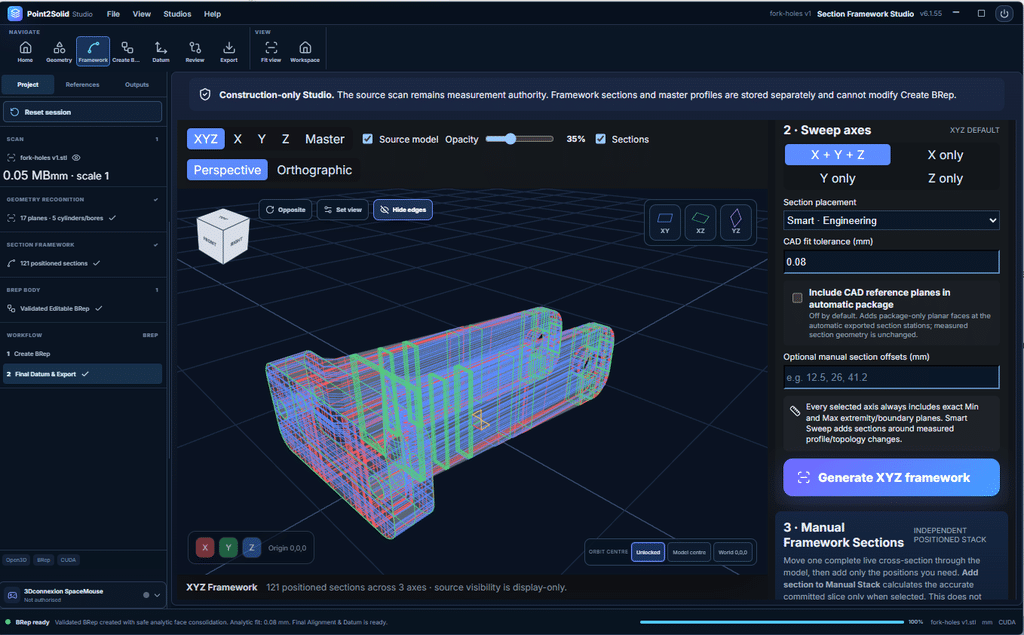
Another important part of Point2Solid Studio is the Framework workspace.
This allows cross-sectional profiles to be generated through the scanned model, either automatically or manually.
These profiles are particularly useful when reverse engineering components that contain complex shapes or changing cross sections.
You can inspect the profiles, work with their geometry and identify features such as lines, arcs and other shapes that may be used to reconstruct the original part.
The Framework tools are being developed to help users build accurate engineering geometry from scan-derived sections, rather than having to recreate every sketch from scratch inside their CAD application.
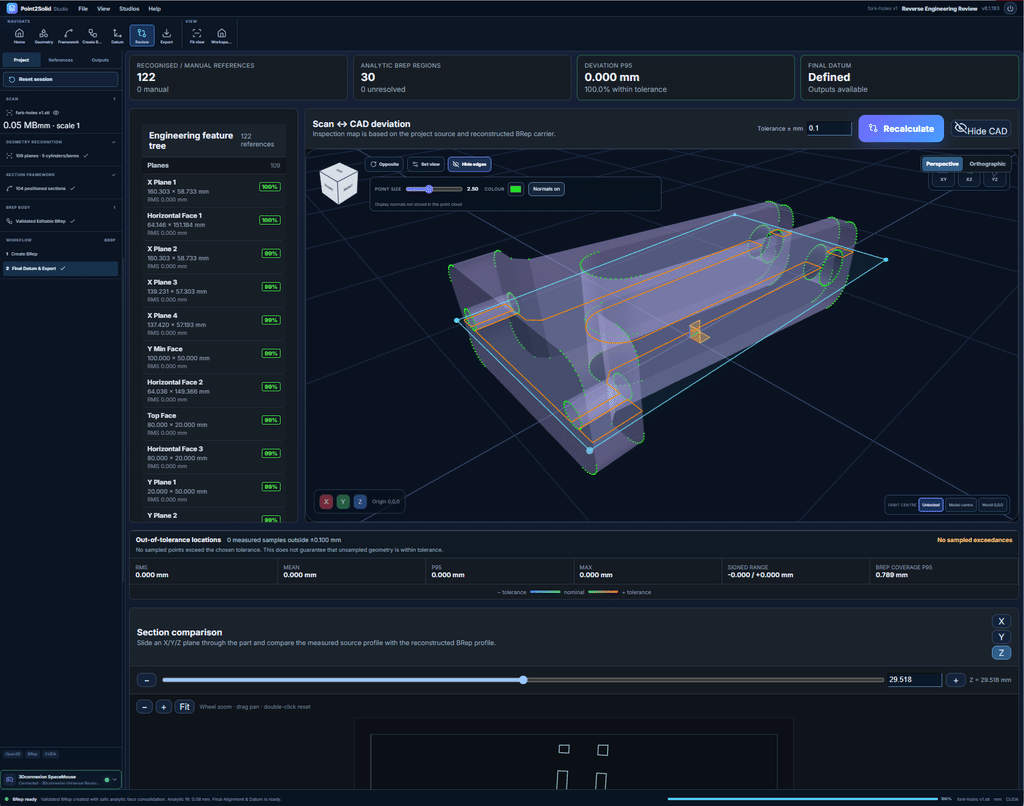
Getting a STEP file is only part of the challenge. It also needs to represent the scanned component accurately.
We’ve therefore been developing tools for comparing reconstructed geometry with the original scan, inspecting surfaces, checking deviations and examining cross sections.
These are especially important when working with bores, radii, fillets and other features where small differences can matter.
7. Additional tools and functionality
As development has progressed, we’ve added a range of other useful capabilities:
- Mesh preparation and processing.
- Interactive 3D inspection.
- Manual geometry selection and confirmation.
- Plane, axis and origin construction.
- Automatic geometry and surface recognition.
- Alignment and coordinate transformations.
- Analytical surface reconstruction where supported.
- Section and loft profile analysis.
- STEP/BRep reconstruction and export.
- Point-cloud export with established engineering datums.
- Model comparison and deviation analysis.
- Support for compatible 3D navigation devices, including the SpaceMouse.
- Experimental AI-assisted reverse-engineering and solid-construction workflows.
Some of these tools are already working well, while others are still being refined and extended.
That’s the nature of a work-in-progress application!
The fork experiment – this is where it gets exciting!
Remember that fork-shaped component from the YouTube tutorial?
I decided to use the same sort of challenging model as a test for Point2Solid Studio.
This is a useful example because the component contains angled faces and features that aren’t conveniently aligned with conventional work planes.
In a typical manual reverse-engineering workflow, considerable time can be spent establishing references, creating sketches and reconstructing the geometry.
Here’s what I do in Point2Solid Studio:
- Load the fork STL model.
- Allow Point2Solid Studio to analyse the geometry.
- Confirm the references I want to use for alignment.
- Select and confirm the engineering origin.
- Generate the BRep STEP file.
And that’s it!
On my test model, I can go from loading the STL to having a BRep STEP file ready for CAD in literally about two minutes.
I can then open that STEP file in Fusion 360 and start working with the solid.
No spending ages manually recreating every angled work plane, sketch and surface just to get a usable starting point!
Now, I should make one thing clear.
Point2Solid Studio is not yet automatically generating a complete parametric model with an editable history of sketches, extrusions, fillets and other original manufacturing features.
That’s a much more complicated challenge, and one we’re actively working towards.
But even without that, having a properly aligned, usable BRep solid that I can immediately work on in CAD is an enormous time-saver.
For example, I can select a suitable face, add a sketch, extrude a new feature or use Boolean operations to modify the component.
It really is that easy! 🙂
What about accuracy and analytical geometry?
This has become one of the biggest areas of development.
Producing a solid that looks like the original scan is relatively straightforward compared with reconstructing accurate engineering geometry.
For example, a scanned cylindrical hole might be represented by hundreds or thousands of tiny flat mesh faces.
Ideally, we want the resulting CAD model to contain a proper mathematical cylinder with an appropriate radius, rather than just a collection of faceted surfaces.
We’ve made good progress in recognising and reconstructing analytical planes, cylinders, bores, radii and some filleted features.
However, complex transitions, curved surfaces and certain fillets are still challenging, and we’re continuing to improve how these are reconstructed.
Not every scan will convert perfectly, and accuracy naturally depends on the quality of the original scan and the complexity of the component.
The objective is to produce the most useful and accurate engineering geometry possible without unnecessarily complicating the workflow.
Built with Python – but you don’t need to be a programmer!
One thing worth mentioning is that Point2Solid Studio is being developed using Python, together with specialist geometry-processing and CAD technologies.
There’s quite a lot of complicated mathematics and geometry processing going on behind the scenes!
But you don’t need to understand any of that to use the application.
We’ve developed a proper Windows installer, so it installs and runs like a normal Windows program.
You don’t need to install Python, write scripts, use a command prompt or understand programming.
If you can install and operate a normal Windows application, that’s the sort of experience we’re aiming to provide.
Some advanced functions naturally require an understanding of 3D geometry and CAD, but the software itself is intended to make the process easier, not more complicated.
Where do we go from here?
Although Point2Solid Studio can already perform some very useful operations, there is still plenty to do.
The next major challenge is moving beyond BRep conversion and towards automatically creating fully editable, parametric 3D CAD models.
Imagine loading a scanned component and having the software identify the original design features, reconstruct the geometry and produce an editable model with meaningful dimensions.
Holes recognised as holes, cylinders reconstructed with proper radii, fillets recreated as mathematical surfaces and dimensional features that can be modified.
We’ve already been experimenting with AI-assisted workflows to help analyse geometry and plan how an object might be reconstructed using conventional CAD operations.
There is considerable potential here, although some of the harder geometry problems are still very much under development.
The important thing is that we’re building on the functionality that already works rather than treating every new idea as a finished feature.
A project that has grown beyond my original expectations
When I first started experimenting with this, I really only wanted a little utility to save myself some time.
I certainly didn’t expect it to develop into a complete Windows application with dedicated workspaces for geometry recognition, alignment, framework profiles, BRep reconstruction and CAD export!
But that is half the enjoyment of developing software.
You start with a problem, discover another problem while solving it, and before you know it you’ve created something considerably bigger than you originally intended.
I’m still learning plenty about 3D scanning and reverse engineering along the way, and not everything works perfectly first time.
However, when I can take a complicated scanned object, establish its alignment and origin, and have a usable STEP solid ready for CAD in a couple of minutes, it makes all the effort worthwhile.
And there’s still much more I want to achieve with it.
Follow the Point2Solid Studio journey
I’ll be sharing more screenshots, demonstrations and videos as development continues, including examples of real scanned objects being converted and modified in CAD.
If you’re interested in 3D scanning, reverse engineering, CAD or simply finding easier ways to do complicated things, please follow the project.
You can find development updates at:
and
I’d also be interested to hear from anyone working with scanned models who has encountered similar problems.
After all, this whole project started because I wanted to make my own life a little easier. If it can eventually do the same for other people, even better!
Mike Edmonston
Plugin Nexus | Creator of Point2Solid Studio
Scan → Recognise → Align → Reconstruct → CAD
Point2Solid Studio is currently under active development. Features, compatibility and conversion results may vary between development builds.