
A 360 degree product photo spinner lets visitors grab, swipe and rotate a product using a sequence of real photographs. For many WooCommerce stores, it is a practical and realistic alternative to creating full 3D models.
Interactive product visuals are no longer just a nice extra. For many ecommerce stores, they are becoming an important part of the buying experience.
Customers want to inspect products from more than one angle. They want to see the shape, proportions, details, labels, ports, finish and real-world appearance before they commit to buying.
Traditionally, one way to create that kind of interaction was to build a full 3D model. But for many physical products, that can be expensive, time-consuming and unnecessary.
This is where a 360 degree product photo spinner can be a very effective alternative. Instead of creating a digital model, you photograph the real product from multiple angles and use those images to create an interactive rotation on your WordPress or WooCommerce product page.
Product visuals
Why static product images are not always enough
Standard product photography is still important, but it has clear limits. A product gallery can show several selected views, but the customer is still restricted to the angles provided.
For some products, that is enough. For others, especially products with important side details, controls, fittings, labels or shape differences, static images may not give the buyer enough confidence.
Limited angles
Customers can only see the specific views you choose to photograph and upload.
Hidden details
Important side, rear or underside details may be missed in a standard gallery.
Less confidence
For higher-value items, unclear visuals can make buyers hesitate before purchase.
Flat presentation
Static images can make a product feel less tangible than a more interactive view.
A 360 product spinner helps bridge the gap between in-store inspection and online shopping by giving visitors a more active way to explore the product.
What is a 360 degree product photo spinner?
A 360 degree product photo spinner is created from a sequence of photographs taken around a product at equal intervals.
The product is usually placed on a turntable and photographed as it rotates. The resulting images are then displayed in a viewer, allowing the visitor to drag, swipe or rotate through the sequence.
The effect is simple but powerful: the visitor can move around the product visually and inspect it from multiple angles.
A 360 product photo spinner allows visitors to:
- drag or swipe to rotate the product
- view the product from different angles
- pause on a specific view
- inspect visible details more confidently
- get a better sense of depth, shape and form
The important point is that this is achieved using real photography, without needing to create a full 3D model.
Photo-based interaction
A practical alternative to 3D modelling
For physical products that already exist, a photo-based spinner can often deliver better real-world realism with less effort than creating a full 3D model.
You are showing the actual product, with its real finish, real shape, real labels and real visual details.
360 product spinners vs true 3D models
Both 360 product spinners and 3D model viewers can make product pages more interactive, but they solve different problems.
For many ecommerce products, photo-based spinners provide the best balance between realism, speed and ease of production. They use real images, require no modelling expertise and fit naturally into an existing product photography workflow.
How a 360 product spinner is created
The process is straightforward: photograph the product in a controlled way, upload the image sequence, and let the viewer present those images as an interactive rotation.
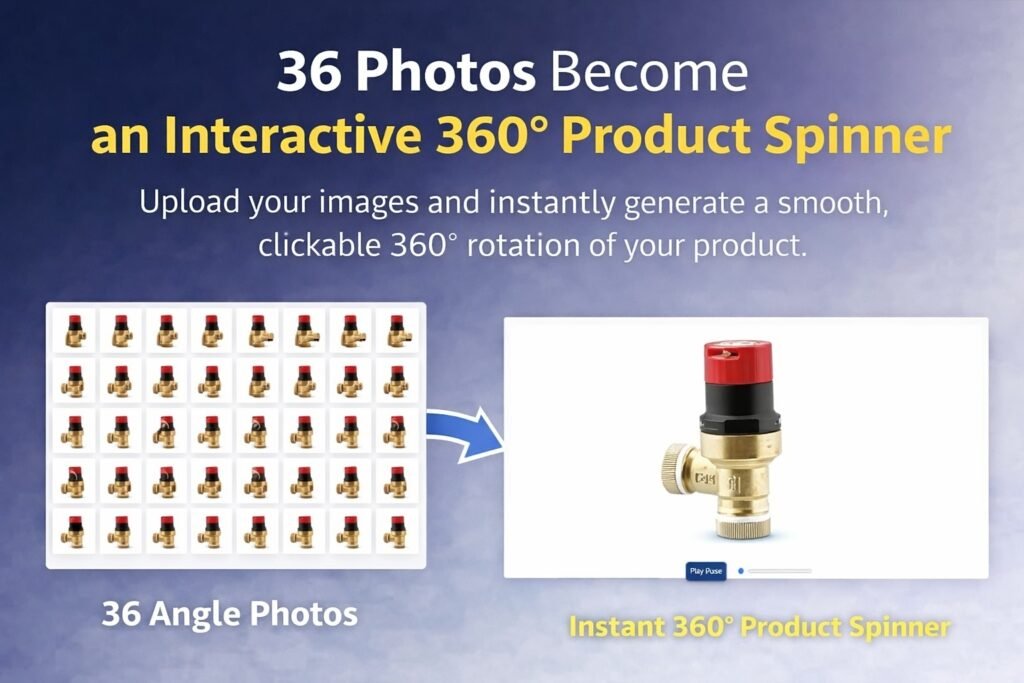
1. Photograph the product on a turntable
The product is placed on a rotating platform and photographed at fixed intervals. This keeps the camera position consistent while the product turns.
2. Keep lighting and framing consistent
For best results, keep the lighting, camera position, background and product placement consistent between every frame. Consistency is usually more important than using expensive equipment.
3. Upload the image sequence to WordPress
Once the images are uploaded in order, the viewer can use them to create the product rotation. The visitor can then drag, swipe or interact with the product on the page.
Why 36 images is a good starting point
A 360 product spinner can use different numbers of images. The right choice depends on the product, the required smoothness and the page performance target.
From a practical point of view:
- 36 images gives one image every 10 degrees and is a strong starting point for many ecommerce products.
- 72 images gives one image every 5 degrees and can create smoother motion for premium or highly detailed items.
More images can make the rotation smoother, but they also increase the amount of image data the page needs to handle. For many products, 36 images is the sweet spot between smooth interaction and sensible performance.
The user experience benefits of 360 product spinners
A good 360 spinner does more than look impressive. It can make the product page more useful.
Higher engagement
Visitors interact with the product instead of only scrolling past static images.
Longer page visits
Interactive visuals can encourage visitors to spend more time inspecting the product.
More confidence
Seeing more angles can reduce uncertainty before purchase.
Fewer surprises
Customers have a clearer idea of what the product looks like before it arrives.
For products where shape, proportions or details matter, that extra interaction can make the buying decision easier.
Where 360 product spinners work best
360 photo spinners are especially useful for physical products where visitors benefit from seeing how the item looks in real life.
Ecommerce products
Give shoppers a clearer view before they add the product to basket.
Tools and fittings
Show shape, controls, ports, mounting points and other visible details.
Technical products
Help buyers inspect components, assemblies, housings and product features.
Home and retail items
Let customers view furniture, accessories, electronics and retail products from more angles.
Anywhere customers benefit from seeing more of the real product, a photo-based spinner can add value.
Implementing 360 product spinners in WordPress
Modern WordPress plugins make 360 product spinners much easier to add than building a custom viewer by hand.
A good 360 product spinner plugin should be:
- easy to add to posts, pages or product layouts
- mobile and touch-friendly
- suitable for WooCommerce product pages
- efficient enough for real-world websites
- simple to manage without custom coding
A typical workflow is:
- Photograph the product sequence.
- Prepare and optimise the images.
- Upload the image set to WordPress.
- Insert the viewer using the plugin’s shortcode or block.
- Preview the page on desktop and mobile.
- Publish the product page.
PINXS 360 Product Rotator
Adding 360 product photo spinners to WordPress
PINXS 360 Product Rotator is designed to help WordPress and WooCommerce site owners add interactive 360 product views using real image sequences.
It takes a folder of product images and creates a player that allows the visitor to view, grab and rotate the product horizontally around 360 degrees.
This makes it useful for product pages where customers need to inspect the product more closely before making a buying decision.
For stores that already use product photography, a 360 rotator can be a practical way to make those images more interactive.
Why photo-based spinners are often the smart choice
For most ecommerce businesses, the goal is not technical perfection. The goal is clarity, trust and ease of use.
A 360 degree product photo spinner combines the realism of photography with the interaction of a 3D-style viewer.
It is practical, scalable and fits naturally into existing product photography workflows.
Performance and image preparation tips
Because a 360 spinner uses multiple images, image preparation matters. The aim is to keep the rotation smooth without making the page unnecessarily heavy.
- Use consistent image dimensions across the full sequence.
- Optimise images before uploading where possible.
- Keep file sizes sensible for web use.
- Use a clean background and consistent lighting.
- Check the spinner on mobile as well as desktop.
- Use 36 images as a practical starting point for many products.
- Use 72 images when smoother rotation is worth the extra file weight.
Good preparation gives visitors a smoother experience and helps keep product pages usable.
360 product spinner checklist
Use this checklist before publishing a product spinner on your site:
- The image sequence is complete and in the correct order.
- Lighting and framing are consistent across all images.
- Images are optimised for web use.
- The spinner works on desktop, tablet and mobile.
- Visitors can clearly drag or swipe to rotate the product.
- The product page still includes standard product images where helpful.
- The surrounding text explains what the visitor is viewing.
- The spinner supports the buying decision rather than distracting from it.
- The page loads at an acceptable speed.
- The product call-to-action remains easy to find.
Final thoughts
Not every product needs a full 3D model.
If you can photograph your product, you can create a compelling interactive experience that helps customers understand exactly what they are buying.
For many WordPress and WooCommerce stores, 360 product photo spinners strike a strong balance between realism, performance and accessibility. They can deliver more engaging product pages without unnecessary modelling complexity.
If you want to add photo-based product rotation to your WordPress website, PINXS 360 Product Rotator is designed to make that process easier.
Plugin Nexus
Add 360 product views to WordPress
PINXS 360 Product Rotator helps you create interactive 360 product photo spinners from real image sequences, giving visitors a better way to inspect products before buying.