VersionV1.0.37
Last updated2026-06-10
SupportLifetime support
Updates12 months

Ai Comment Manager for WordPress

Price range: £39.00 through £197.00

Bring intelligent, human-like comment engagement to WordPress — fast, flexible, and effortlessly automated.


Perfect for blogs, ecommerce, memberships, creators, and businesses that want to stay responsive without spending hours replying.

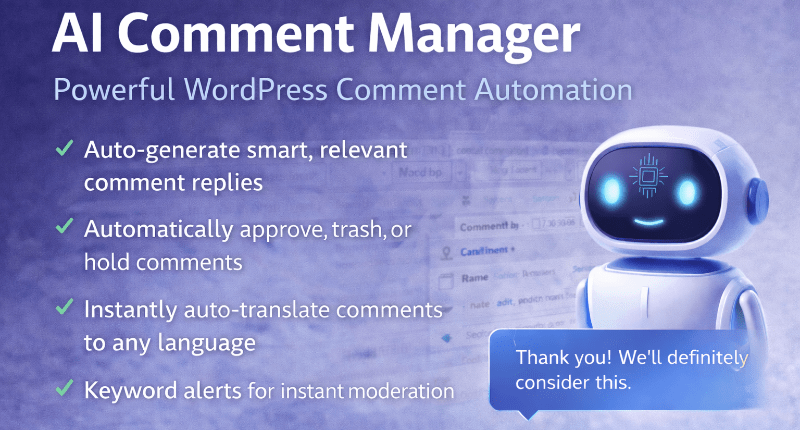
✓ AI-powered automatic comment replies
✓ Customizable tone & behavior settings
✓ Smart spam & toxicity detection
✓ Optional fixed or random reply delays for natural timing
✓ Multilingual auto-detection & responses
✓ Works with all themes & page builders
✓ Simple API key setup — no coding required

The easiest way to automate, enhance, and humanize your WordPress comment section.

Description

AI-Powered WordPress Comment Automation

AI Comment Manager Plugin

Automatic replies
Let AI generate helpful, natural replies to WordPress comments while you stay in control.
Smart moderation
Detect spam, low-effort comments, inappropriate language and unwanted content faster.

WordPress AI Comment Manager Plugin

Turn comments into an AI-powered engagement engine

The AI Comment Manager Plugin helps your WordPress site automatically reply to comments, moderate conversations, detect unwanted content and keep discussions active — without manually responding to every message.

Perfect for blogs, WooCommerce stores, membership sites, coaches, educators, agencies, SaaS platforms and community-driven websites that want faster replies, smarter moderation and better engagement.

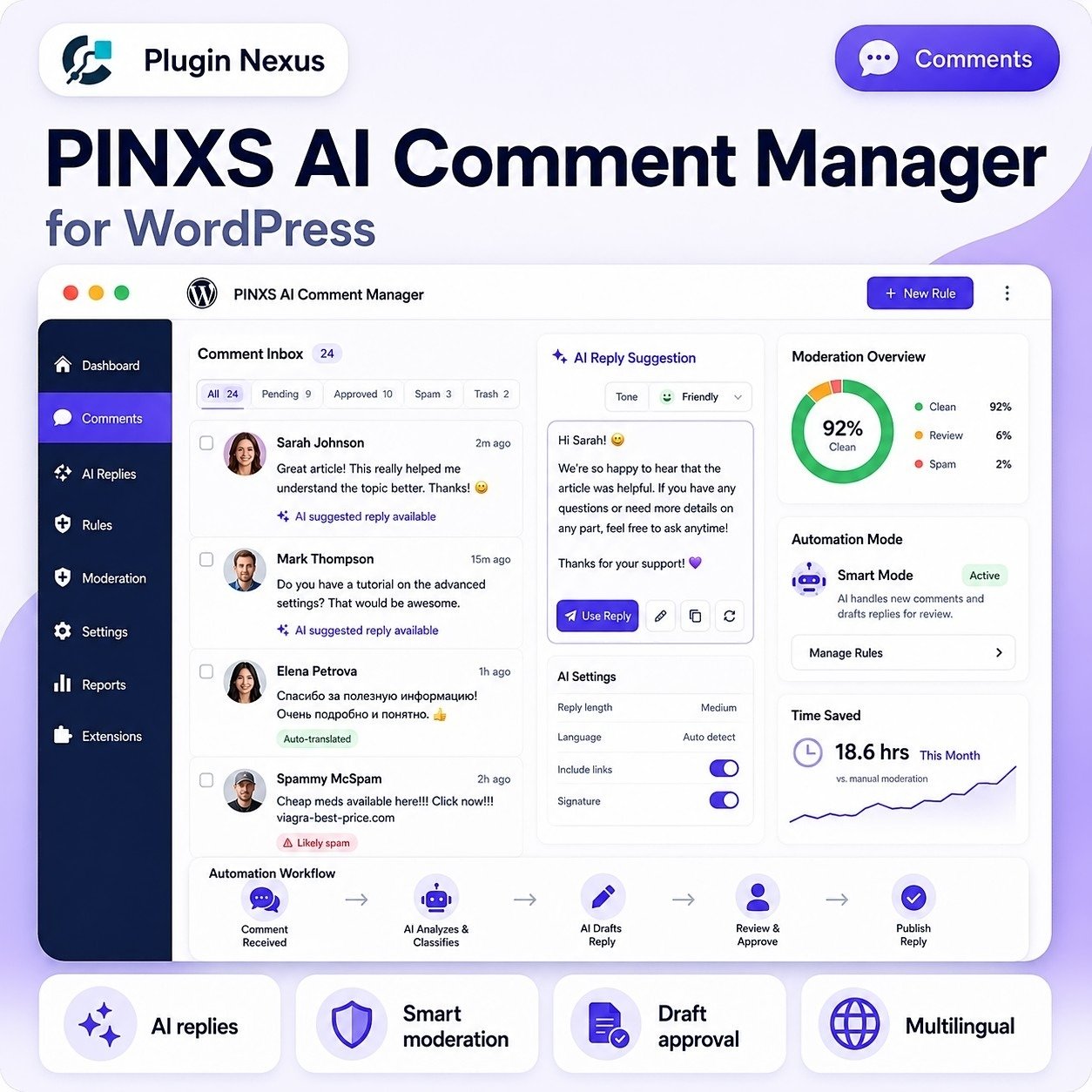
AI auto-replies
Smart moderation
Draft approval mode
Brand tone control
Multilingual replies
WordPress native

🤖

Human-like AI replies

Generate natural, helpful, on-brand comment replies that sound professional and engaging.

🛡️

Smart moderation

Help detect spam, toxic comments, low-effort replies and inappropriate language before it damages your site.

Massive time savings

Stop manually replying to repetitive comments and let AI handle routine engagement for you.

How it works

Set up automated comment handling in a simple WordPress-friendly workflow.

1. Install the AI Comment Manager plugin
2. Add your AI provider API key
3. Choose your reply tone, rules and moderation mode
4. Enable automation, draft approval or hybrid mode

Why automate comments?

Fast replies and cleaner comment threads help your website feel active, responsive and trustworthy.

Save time
Boost engagement
Reduce spam
Stay responsive
Protect your brand
Scale support

AI Comment Manager vs Manual Comment Handling

Give your comment section faster replies, cleaner moderation and more consistent engagement.

Reply speed
AI Manager: Instant
Manual: Delayed
Workload
AI Manager: Low
Manual: High
Brand voice
AI Manager: Consistent
Manual: Varies
Spam detection
AI Manager: Assisted
Manual: Time-heavy
Multilingual support
AI Manager: Built in
Manual: Harder
Approval control
AI Manager: Draft mode
Manual: Full manual
Busy comment threads
AI Manager: Scalable
Manual: Slow
Best use case
AI Manager: Active sites
Manual: Low volume
Use AI Comment Manager when your site receives comments, questions, feedback or community discussion and you want faster replies without losing control of what gets published.

Key features

🤖

AI-powered replies
Automatically generate useful, human-like replies to WordPress comments.

🔑

Simple API connection
Connect your AI provider with an API key and manage settings inside WordPress.

🧹

Spam & toxicity detection
Help identify unwanted, low-quality or inappropriate comments before they take over.

🎨

Tone & personality presets
Choose friendly, professional, witty, educational or custom brand voice responses.

🌍

Language auto-detection
Detect each commenter’s language and reply in the same language when enabled.

📝

Draft approval mode
Let AI prepare replies for you to review, edit and approve before publishing.

📬

Busy thread assistance
Generate reply suggestions for active posts and high-volume comment sections.

🚀

Lightweight WordPress native
Built to work with the standard WordPress comment system and major themes.

Who is it for?

✍️

Bloggers
Keep discussions active and reply to readers without manually checking every post.

🛒

WooCommerce stores
Answer pre-sale questions, product comments and customer discussions more quickly.

🎥

Influencers & creators
Nurture your community and keep followers engaged across active content.

💼

Agencies
Offer AI-powered engagement and moderation as an added service for client sites.

🎓

Course & membership sites
Reply to students, members and community discussions with less admin time.

🚀

Startups & SaaS
Give fast, helpful responses in comment threads, docs, updates and support-style posts.

🏢

Business websites
Keep your site responsive and professional when visitors leave questions or feedback.

🧑‍💻

Site owners
Reduce the pressure of comment moderation and stay on top of conversations.

Perfect for WordPress comment management

Use AI-powered automation to keep comment sections active, clean and helpful while reducing the time you spend manually replying and moderating.

✓ WordPress comments
✓ WooCommerce discussions
✓ Blog engagement
✓ Membership communities
✓ Comment moderation
✓ Faster responses

🔒

You stay in control

Choose instant auto-replies, draft mode for approval, or a hybrid workflow where some comments are handled automatically and others remain manual.

🧩

Works with major builders

Designed around the WordPress comment system, so it works with standard themes and popular builders such as Gutenberg, Elementor, Divi and Bricks.

Choose your license

Each license includes the plugin download, 1 year of updates, lifetime support and unlimited comment automation on the licensed sites.

Starter
1 Site License — £39

Perfect for blogs, coaches and solo creators managing one WordPress website.

Growth
3 Site License — £97

Ideal for freelancers, marketers and small teams running multiple sites.

Best for agencies
Unlimited Sites — £197

Best for agencies and developers managing many client websites.

Frequently asked questions

Do all license levels include the same features?
Yes. The only difference is how many websites you can activate.
Do I need an external AI service or API key?
Yes. You connect your AI provider by pasting your API key into the plugin settings. The plugin handles the WordPress comment workflow.
Can I approve replies before they go live?
Yes. Use draft mode so AI-generated replies can be reviewed, edited and approved before publishing.
Will it slow down my site?
The plugin is built to be lightweight and WordPress-native. AI calls are handled through the configured provider rather than heavy on-page scripts.
Does it work with Elementor, Divi and Bricks?
Yes. It integrates with the WordPress comment system, so it is not tied to a specific page builder layout.

Turn WordPress comments into an AI-powered engagement engine

Increase interaction, save hours of manual work, respond faster and keep your community active — without being chained to your inbox or comment dashboard.
WordPress AI Comment Manager

PINXS AI Comment Manager Features

PINXS AI Comment Manager helps WordPress site owners review comments more efficiently using AI-assisted moderation, spam support and editable reply suggestions.

It is designed for blogs, product review sites, WooCommerce stores, affiliate websites and content-heavy WordPress sites where comment quality, response time and moderation control matter.

Core Purpose

  • Manage WordPress comments more efficiently using AI-assisted review tools.
  • Help site owners handle spam, low-quality comments and genuine engagement.
  • Use OpenAI-powered analysis to support moderation decisions.
  • Review comments before approval.
  • Improve response quality with AI-assisted reply suggestions.
  • Save time compared with manually reading and writing every comment response.
  • Useful for blogs, product review sites, WooCommerce stores, affiliate websites and content-heavy WordPress sites.

AI Comment Review

  • Analyse submitted comments using AI.
  • Identify potentially spammy or low-value comments.
  • Highlight comments that may need manual review.
  • Help detect comments that are irrelevant to the post topic.
  • Assist with spotting overly generic, suspicious or automated-looking comments.
  • Support better moderation decisions before publishing.
  • Reduce the time spent checking comment queues manually.

Comment Moderation Workflow

  • View comments from a dedicated admin area.
  • Review pending comments.
  • Approve genuine comments.
  • Reject or delete unsuitable comments.
  • Keep moderation decisions under administrator control.
  • Use AI as an assistant rather than giving it full control.
  • Maintain a cleaner and safer comment section.
  • Protect the public-facing site from poor-quality discussion.

AI Reply Generation

  • Generate suggested replies to comments.
  • Create polite and professional responses.
  • Help answer visitor questions more quickly.
  • Save time when responding to repeated comment themes.
  • Edit AI-generated replies before posting.
  • Keep the final published response under admin control.
  • Useful for blog comments, product questions and customer engagement.

Tone and Response Control

  • Produce friendly replies.
  • Produce helpful customer-focused replies.
  • Keep responses professional.
  • Adjust generated replies before publishing.
  • Avoid rushed or inconsistent comment responses.
  • Help maintain a consistent website voice.
  • Useful when more than one person helps manage the site.

Spam and Low-Quality Comment Support

  • Help identify comments that look promotional.
  • Help identify vague “great post” style comments.
  • Help flag irrelevant comments.
  • Help spot comments that may contain suspicious links.
  • Reduce time wasted on obvious spam.
  • Improve comment quality across the website.
  • Keep genuine visitor discussion easier to find.

Admin Dashboard

  • Central area for AI comment tools.
  • Quick access to review and moderation functions.
  • Comment status overview.
  • AI response generation controls.
  • Settings area for API and moderation options.
  • Cleaner workflow than jumping between multiple WordPress screens.
  • Designed for site owners who want practical comment management tools.

OpenAI API Connection

  • Uses an OpenAI API key rather than a separate SaaS comment moderation subscription.
  • Site owner remains in control of the API connection.
  • API usage can be managed directly through the user’s OpenAI account.
  • No need to send comment management through a bundled third-party SaaS plan.
  • More flexible for users who already use OpenAI API services.
  • Suitable for self-hosted WordPress software users who prefer direct API-based tools.

Cost Control

  • Uses the customer’s own OpenAI API key.
  • Avoids fixed monthly SaaS pricing for comment management.
  • API usage depends on actual comment and reply activity.
  • Useful for smaller sites that do not need a large subscription.
  • Helps keep costs proportional to usage.
  • Admins can choose when to run AI assistance rather than processing everything unnecessarily.

Manual Approval Control

  • AI supports the moderation process but does not need to replace human judgement.
  • Admin can review each suggestion.
  • Admin can approve, edit or ignore AI replies.
  • Admin can decide whether a comment should be published.
  • Keeps important moderation decisions with the site owner.
  • Reduces the risk of publishing unsuitable automated responses.

WordPress Comments Integration

  • Works with the normal WordPress comment system.
  • Helps manage existing comment workflows.
  • Suitable for posts and pages that allow comments.
  • Useful for blog-style websites.
  • Useful for product review or affiliate content.
  • Keeps comment tools inside WordPress admin.
  • Avoids moving comment management to an external dashboard.

WooCommerce and Product Sites

  • Useful for product-related comments or reviews where supported by the site setup.
  • Helps respond to product questions.
  • Helps moderate low-quality promotional comments.
  • Useful for affiliate product sites that receive comment spam.
  • Can support a more professional customer-facing discussion area.
  • Helps store owners reply more consistently.

Blog and Content Site Use

  • Useful for active blogs with visitor comments.
  • Helps manage discussion on product guides, tutorials and reviews.
  • Speeds up replies to common visitor questions.
  • Helps reduce generic spam comments.
  • Maintains better quality on public blog posts.
  • Encourages genuine visitor engagement by making replies easier.

Settings and Configuration

  • Add and save the OpenAI API key.
  • Configure AI behaviour where available.
  • Set moderation preferences.
  • Adjust reply generation options.
  • Review default settings before using on live comments.
  • Test with a small number of comments before relying on the workflow.
  • Keep API keys private and never publish them publicly.

Security and Privacy

  • OpenAI API key should be stored carefully.
  • Admin access should be limited to trusted users.
  • Do not give comment moderation access to untrusted accounts.
  • Avoid sending sensitive private information in comments where possible.
  • Review AI-generated text before publishing it publicly.
  • Keep WordPress, the theme and plugins updated.
  • Back up the site before major plugin updates.

Practical Workflow

Install and activate the plugin.
Enter the OpenAI API key.
Review plugin settings.
Open the comment management area.
Select pending or existing comments to review.
Use AI analysis to help assess comment quality.
Generate a suggested reply where useful.
Edit the response if needed.
Approve, reply, reject or delete the comment.
Check the public page to confirm the result looks correct.

Practical Use Cases

Blog comment moderation
Affiliate website comment cleanup
Product guide question replies
WooCommerce product discussion support
Tutorial website comment replies
Reducing spam review time
Improving reply consistency
Managing comments on content-heavy WordPress sites
Helping solo site owners keep up with comments
Supporting small teams that manage website engagement

Suggested Website/Product Page Feature Blocks

AI-assisted moderation
OpenAI API powered
Reply generation
Spam support
Manual approval control
WordPress comment workflow
Blog and product site ready
Admin dashboard tools
Lower-cost API-based setup
No fixed SaaS moderation platform required
Editable AI replies
Faster comment management

Additional information

License

1 Site License, 3 Site License, Unlimited Sites

Built for serious WordPress sites

Clean, focused software made for performance, security, and practical site management.

  • Fast installation and clear setup flow
  • Regular updates and maintainable code
  • Designed to work with WooCommerce stores
  • Support and documentation friendly

Compatibility

VersionV1.0.37
Tested up toV7.0
Requires WP6.0+
Requires PHP7.4+ recommended, tested on PHP 8.3
HTMLHTML5
CSSCSS3
Download size75KB
LicenceLifetime licence
SupportLifetime support
Updates12 months
WooCommerceCompatible
Last updated2026-06-10
Single Site

Ideal for one website

Use on one live WordPress site. Ideal for a single business website, WooCommerce shop, portfolio, product page, or client project where only one activation is needed.

Multi Site

Great for client work

Choose this option if you manage several websites or need to use the plugin on more than one WordPress install. A good fit for freelancers, small studios, or businesses with multiple product sites.

Unlimited

Best for agencies, developers, and repeat projects

The unlimited licence is designed for people building multiple websites, client stores, product catalogues, or bundled services. It gives you more flexibility when using the plugin across a wider range of projects.

Leave a review

Be the first to review this product.

Reviews

There are no reviews yet.

Only logged in customers who have purchased this product may leave a review.

Ready to get started?

Choose your licence and complete your purchase securely.

Choose Licence & Buy Now
PINXS Ai Chatbot
Contact Page