

VersionV1.0.8
Last updated2026-06-06
SupportLifetime
Updates12 months

360 Product Rotator for WordPress

Price range: £39.00 through £197.00

🛍️ 360° product image spinner WordPress plugin.

Ideal for:
• 360° product image rotation
• Interactive product displays
• Detailed visual inspection
• Improving ecommerce conversion rates

Turn a set of photos into an interactive 360° product viewer directly inside WordPress.

Description

Live Interactive 360° Demo
Desktop controls
Click & drag to rotate · Use auto-spin if enabled · Inspect products from every angle
Mobile controls
Swipe left or right to rotate · Touch-friendly product exploration for phones and tablets

WordPress 360° Product Rotator Plugin

Create interactive 360° product views without 3D modelling

The 360° Product Rotator Plugin turns a simple photo sequence into a smooth, touch-friendly, interactive product viewer directly inside WordPress.

From as few as 24–36 photos, your visitors can rotate, inspect and explore your product from every angle — just like a 3D viewer, but without the cost, software or learning curve of 3D modelling.

Real product photography
No 3D files required
WooCommerce ready
Mobile friendly
24–36 photo workflow
No external service

🔄

Smooth 360° rotation

Visitors can drag, swipe or auto-rotate the product for a seamless inspection experience.

📸

Uses real photos

Show customers the actual product, not a rendered approximation or expensive 3D model.

Lightweight and fast

Optimised JavaScript and CSS help keep product pages smooth, responsive and fast-loading.

How it works

Create interactive 360° views using a simple photo workflow.

1. Place your product on a turntable or rotate it manually
2. Take a sequence of photos, usually 24–36 images
3. Upload the images to WordPress
4. Insert the viewer using a shortcode or block

Why use image rotation?

A 360° image viewer gives you interactive product presentation without a complex 3D workflow.
Lower cost
Faster setup
Real photos
No modelling
Easy to learn
Shopper friendly

360° Rotator vs 3D Model Viewer

Choose the right visual experience for the product content you already have.

Requires 3D modelling
360° Rotator: No
3D Viewer: Yes
Uses real photos
360° Rotator: Yes
3D Viewer: No
Setup time
360° Rotator: Minutes
3D Viewer: Hours / Days
Multiple viewers per page
360° Rotator: Yes
3D Viewer: Usually no
Content creation cost
360° Rotator: Low
3D Viewer: Higher
Real-world product accuracy
360° Rotator: Photo-real
3D Viewer: Rendered
File preparation
360° Rotator: Image sequence
3D Viewer: 3D file setup
Best product type
360° Rotator: Physical stock
3D Viewer: Digital models
Use the 360° Rotator when you have real product photos. Use a 3D Viewer when you already have true 3D files. Many stores use both depending on the product.

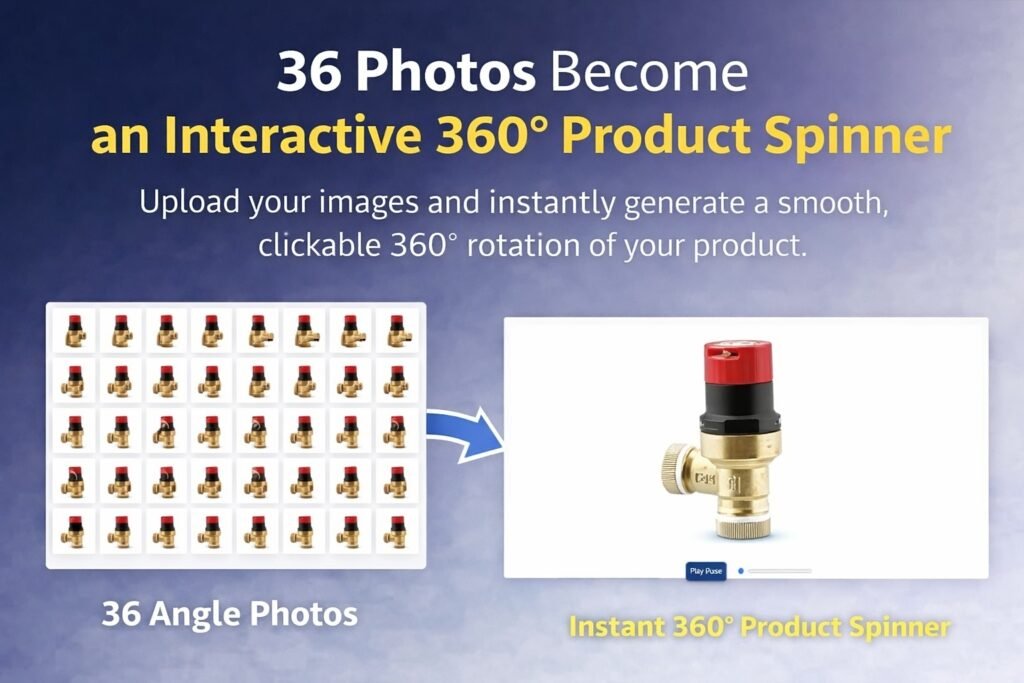
360 product photo spinner banner

Key features

🔄

Smooth rotation
Drag, swipe or auto-rotate products for detailed inspection.

📱

Mobile touch support
Swipe gestures make interaction natural on phones and tablets.

🧩

Shortcode integration
Insert viewers into pages, posts, product descriptions and landing pages.

🖼️

Real product photography
Customers see the exact product details captured in your own photos.

▶️

Auto-spin option
Let products rotate automatically to attract attention and demonstrate the full view.

🧱

Multiple viewers
Use different 360° viewers across product pages, landing pages and category showcases.

⚙️

Simple image workflow
Create viewers from normal product photos without specialist 3D software or modelling skills.

🚀

Sales-page ready
Use interactive product rotation on WooCommerce products, landing pages, demos and promotional pages.

Who is it for?

🛒

WooCommerce stores
Improve product listings with interactive, photo-based product rotation.

📸

Product photographers
Turn image sets into polished interactive viewers for clients.

🏭

Manufacturers
Show physical goods, tools, components, parts and assemblies from every angle.

🚀

Startups & small businesses
Create premium product experiences without expensive 3D production.

🧰

Parts catalogues
Let customers inspect tools, replacement parts, accessories and product variations.

💼

Agencies & client sites
Add professional interactive product views to client stores without custom development.

🎨

Craft sellers & makers
Show handmade items, custom products and small-batch goods with a premium interactive feel.

📦

Online retailers
Help shoppers inspect real stock before buying and reduce uncertainty on product pages.

Perfect for WooCommerce

Use interactive 360° viewers to help shoppers understand products better, inspect details and buy with more confidence.

✓ Product listings
✓ Feature highlights
✓ Close-up inspections
✓ Conversion optimisation
✓ Product confidence
✓ Reduced uncertainty

🔒

Built for stability

Clean WordPress-native code, secure file handling and compatibility with modern WordPress versions.

🧩

No external services

Your 360° product views run directly from your WordPress site without relying on third-party viewer platforms.

Bring products to life — without 3D modelling

Give customers the confidence to explore products from every angle, increase engagement and improve conversions using the images you already know how to create.


WordPress 360° Product Rotator

PINXS 360 Product Rotator Features

PINXS 360 Product Rotator helps you create interactive 360° product spinners inside WordPress using real product photos instead of 3D model files.

Upload a photo sequence, generate a rotator, copy the shortcode and place the spinner on pages, posts or WooCommerce products without relying on complex desktop software or annual 360° platform subscriptions.

Core Purpose

  • Create interactive 360° product spinners inside WordPress.
  • Use real product photos instead of 3D model files.
  • Let visitors drag, rotate and inspect a product from all sides.
  • Upload a photo sequence and generate a spinner directly in WordPress.
  • Copy a shortcode and place the spinner on any page, post or product.
  • Avoid complex desktop software and annual 360° platform subscriptions.
  • Ideal for WooCommerce products, product photography, portfolios, catalogues and demo pages.

Simple 360° Workflow

  • Photograph the product from multiple angles.
  • Upload the images into the plugin.
  • Let the plugin build the 360° spinner.
  • Copy the generated shortcode.
  • Paste the shortcode into a page, post or WooCommerce product.
  • Publish and test the interactive product view.
  • No separate desktop application required.
  • No manual image stitching workflow required.

36 Photo / 10 Degree Capture Method

36 images × 10 degrees = full 360° rotation.

  • Take 36 photos around the product.
  • Rotate the product by 10 degrees between each shot.
  • Use a turntable, marked base, printed angle guide or product photography table.
  • Keep the camera locked in the same position.
  • Keep lighting consistent across all images.
  • Keep exposure, white balance and focus fixed.
  • Use consistent framing so the product stays centred.
  • Name images in sequence order for easier upload and management.

Photography Setup

  • Use a tripod for the camera.
  • Use fixed manual exposure where possible.
  • Use manual white balance to avoid colour shifts.
  • Use manual focus to keep the product sharp.
  • Use soft, even lighting.
  • Avoid strong moving shadows.
  • Keep the product centred on the turntable.
  • Use a clean background.
  • Avoid changing zoom, camera height or angle during the sequence.
  • Review the full image set before uploading.

Image Upload

  • Upload the full product image sequence.
  • Upload images in rotation order.
  • Use clear filenames such as product-001, product-002, product-003.
  • Keep all images the same size and orientation.
  • Use web-friendly JPG or PNG images.
  • Optimise image size before upload for faster page loading.
  • Replace incorrect frames if a product angle is wrong.
  • Manage image sequences from the WordPress admin area.

Automatic Spinner Generation

  • The plugin uses the uploaded image sequence to create the 360° rotator.
  • No separate joining process required.
  • No external 360° hosting platform required.
  • No desktop software export workflow required.
  • The spinner is generated inside WordPress.
  • Once saved, the plugin provides a shortcode for display.
  • The same spinner can be reused wherever the shortcode is placed.

Shortcode Output

  • Automatically generates a shortcode for each 360° product spinner.
  • Shortcode can be copied into WordPress pages.
  • Shortcode can be copied into WordPress posts.
  • Shortcode can be used in WooCommerce product descriptions.
  • Shortcode can be placed in shortcode blocks.
  • Shortcode can be used in compatible page builders.
  • Allows easy placement without coding.

WooCommerce Use

  • Add 360° product views to WooCommerce product pages.
  • Help customers inspect products before buying.
  • Use alongside normal product images and galleries.
  • Useful for watches, jewellery, tools, furniture, models, parts, crafts and manufactured products.
  • Improves customer confidence by showing the real product from multiple angles.
  • Makes product pages feel more interactive and premium.

Visitor Interaction

  • Visitors can drag to rotate the product.
  • Touch-friendly controls for phones and tablets.
  • Mouse-friendly controls for desktop users.
  • Smooth product inspection experience.
  • Useful for showing front, side, back and detail angles.
  • Helps visitors understand product shape better than a single static photo.
  • Works well for visual products where shape and finish matter.

Real Photo Advantage

  • Uses real product photography.
  • No 3D modelling required.
  • No GLB, OBJ, STL or model file preparation required.
  • Shows the actual product finish, colour, texture and lighting.
  • Easier for photographers and store owners than creating 3D assets.
  • Works well when the product already exists physically.
  • Ideal for eCommerce photography workflows.

Compared with External 360° Software

  • No annual SaaS-style 360° viewer subscription required.
  • No need to export from a separate desktop app.
  • No need to upload images to a third-party hosted spinner platform.
  • No complicated multi-stage workflow.
  • Keeps the spinner workflow inside WordPress.
  • Keeps product assets under the site owner’s control.
  • Faster process once the image sequence has been photographed.

Spinner Management

  • Create multiple 360° spinner records.
  • Manage each product spinner separately.
  • Edit existing spinner image sets.
  • Replace images where needed.
  • Reuse shortcodes across the site.
  • Keep product spinners organised by product name.
  • Maintain a library of rotators inside WordPress.

Display Settings

  • Configure spinner size.
  • Adjust layout for pages or product areas.
  • Set viewer behaviour where supported.
  • Control how the spinner appears on desktop and mobile.
  • Match the display area to the website design.
  • Test the spinner before adding it to a live product page.

Mobile Friendly Use

  • Supports touch interaction.
  • Suitable for mobile product browsing.
  • Works on tablets and phones where the browser supports modern web interaction.
  • Helps shoppers inspect products without needing to zoom into multiple still images.
  • Should be tested on mobile before launch.
  • Image optimisation is important for mobile loading speed.

Performance Considerations

  • Optimise images before upload.
  • Keep file sizes reasonable.
  • Use consistent image dimensions.
  • Avoid uploading unnecessarily large camera files.
  • Compress JPG images for web use.
  • Test page loading speed after adding a spinner.
  • Consider fewer frames for very simple products if loading speed is more important than ultra-smooth rotation.
  • 36 frames is a strong balance for smooth 10-degree rotation.

Practical Use Cases

Product photography portfolios
WooCommerce product pages
Jewellery and watches
Handmade products
Tools and equipment
Collectables
Furniture and home products
3D printed real products
Product demo pages
Sales landing pages
Client proofing pages
Online catalogues

Admin and Security

  • Spinner creation should be restricted to trusted administrators.
  • Upload access should not be given to untrusted users.
  • Keep original product photo files backed up.
  • Back up the WordPress site before major updates.
  • Keep WordPress, theme and plugins updated.
  • Test new rotators on a draft page before publishing.
  • Avoid deleting image files that are used by live spinners.

Suggested Website/Product Page Feature Blocks

Real photo 360° spinners
36 image workflow
10 degree product rotation
WordPress shortcode output
WooCommerce ready
Mobile friendly
No 3D files required
No desktop app workflow
No annual SaaS viewer required
Product photography friendly
Drag to rotate
Simple upload and publish workflow

Additional information

License

1 Site License, 3 Site License, Unlimited Sites

Built for serious WordPress sites

Clean, focused software made for performance, security, and practical site management.

  • Fast installation and clear setup flow
  • Regular updates and maintainable code
  • Designed to work with WooCommerce stores
  • Support and documentation friendly

Compatibility

VersionV1.0.8
Tested up toV7.0
Requires WP6.0+
Requires PHP7.4+ recommended, tested on PHP 8.3
HTMLHTML5
CSSCSS3
Download size16KB
LicenceLifetime licence
SupportLifetime
Updates12 months
WooCommerceCompatible
Last updated2026-06-06
Single Site

Ideal for one website

Use on one live WordPress site. Ideal for a single business website, WooCommerce shop, portfolio, product page, or client project where only one activation is needed.

Multi Site

Great for client work

Choose this option if you manage several websites or need to use the plugin on more than one WordPress install. A good fit for freelancers, small studios, or businesses with multiple product sites.

Unlimited

Best for agencies, developers, and repeat projects

The unlimited licence is designed for people building multiple websites, client stores, product catalogues, or bundled services. It gives you more flexibility when using the plugin across a wider range of projects.

Leave a review

Be the first to review this product.

Reviews

There are no reviews yet.

Only logged in customers who have purchased this product may leave a review.

Ready to get started?

Choose your licence and complete your purchase securely.

Choose Licence & Buy Now
PINXS Ai Chatbot
Contact Page