VersionV1.8.82
Last updated2026-06-06
SupportLifetime support
Updates12 months

Income & Expenses

Price range: £29.99 through £197.00

PINXS Income & Expenses Manager is a WordPress business finance plugin that helps you record income, track expenses, manage customers and sources, organise categories, review reports and prepare cleaner records for UK tax and Self Assessment workflows.

Instead of relying on scattered spreadsheets, notes and receipt folders, you can keep your key business records inside your WordPress admin area. The plugin gives you a clearer view of revenue, costs, profit, recurring payments, financial summaries and exportable data, making it easier to understand how your business is performing.

It is especially useful for freelancers, sole traders, consultants, small businesses, digital product sellers and WooCommerce store owners who want a practical way to stay organised, reduce admin time and prepare better information for accountant or tax return review.

Includes: Lifetime licence, lifetime support, 12 months updates.

Description

WordPress Income, Expense & UK Tax Management
Financial Dashboard
£24,850
Income tracked with expenses, profit and reporting in one place.
Monthly Overview
Reconciled
Income
£8.4k
Costs
£2.1k
Profit
£6.3k
Built for real business records
Track income, expenses, customers, payment types, categories, documents and reconciliation from inside WordPress.
UK tax ready workflow
Includes UK tax settings and Self Assessment tools for SA100 and SA103S style record preparation.

WordPress Income & Expenses Manager Plugin

Manage income, expenses and reports inside WordPress

PINXS Income & Expenses Manager helps small businesses, freelancers and site owners record business income, track expenses, manage customers and sources, generate reports and keep financial records organised from a familiar WordPress admin area.

Use it as a practical business record system with dashboards, category management, recurring transactions, balance sheet views, import/export tools, document references, reconciliation controls and UK-focused tax preparation features.

Income tracking
Expense management
Financial reports
UK Self Assessment
CSV / PDF / Excel export
WordPress native

📊

Clear financial dashboard

See income, expenses, profit, recent activity and recurring items in one organised WordPress dashboard.

💷

Income and expense control

Record business income, categorise expenses, manage payment types and keep your records consistent.

📝

UK tax preparation

Built-in UK tax settings and Self Assessment tools help organise records for accountant or tax return preparation.

How it works

A practical workflow for keeping business records under control.

1. Set opening balance and UK tax settings
2. Add customers, sources, income types and expense categories
3. Record income, expenses, recurring transactions and documents
4. Review dashboards, export reports and prepare tax records

Why use it?

Replace scattered notes, loose receipts and separate spreadsheets with one structured WordPress record system.

Track profit
Manage records
Export data
Prepare tax
Attach files
Reduce admin

PINXS Income & Expenses Manager vs Manual Spreadsheets

A spreadsheet can work at the start, but business records quickly become harder to manage when income, expenses, categories, documents and tax preparation are spread across separate files.

Record structure
Plugin: OrganisedSheets: Manual
Reports
Plugin: Built inSheets: Built by hand
Documents
Plugin: Linked filesSheets: Separate
Recurring items
Plugin: SupportedSheets: Easy to miss
UK tax workflow
Plugin: GuidedSheets: Manual
Exports
Plugin: CSV / PDF / ExcelSheets: Limited
Reconciliation
Plugin: Status trackingSheets: Manual checks
Best use case
Plugin: Ongoing recordsSheets: Simple lists
Use PINXS Income & Expenses Manager when you want a structured WordPress-based system for tracking business records, producing reports and preparing cleaner information for tax or accountant review.

Business records made clearer

Track, report and prepare with confidence

A complete admin workflow for income, expenses, reports, exports, balance sheets, recurring transactions and UK Self Assessment preparation.

ReportsReady

Key features

📊

Dashboard overviewView financial metrics, charts, recent activity and recurring payment information.

👥

Customers and sourcesManage customers, income sources, contact details and source records.

💰

Income trackingRecord income, payment dates, taxable status, notes and supporting references.

💸

Expense managementCategorise expenses, track business costs and organise spending records.

🔄

Recurring transactionsSupport recurring income and expenses so regular items are easier to manage.

📈

Financial reportsGenerate structured reports for reviewing income, expenses and business performance.

📋

Balance sheet viewSee financial position and running balance information from your entered records.

📤

Export optionsExport data and reports in useful formats including CSV, PDF and Excel-style output.

📥

Import toolsBulk import data from CSV files to speed up setup and migration.

🏴

UK tax settingsIncludes UK-focused tax constants, personal allowance and basic rate settings.

📝

Self Assessment toolsPrepare SA100 and SA103S style records with calculation and export workflow support.

🔐

Security focusedBuilt with sensitive financial records in mind, including encryption support requiring PHP Sodium.

Who is it for?

🧑‍💻

FreelancersTrack client income, expenses, profit and records without relying on scattered spreadsheets.

🏢

Small businessesKeep business records organised and ready for monthly review or accountant handover.

🛒

WooCommerce sellersUseful for digital product sellers and store owners who want clearer business record keeping.

🎨

Creators and consultantsRecord project income, software sales, consulting fees, costs and receipts in one place.

📚

Training providersTrack course income, operating expenses, recurring subscriptions and customer sources.

💼

AgenciesManage client payments, recurring charges, subscriptions, expenses and exported reports.

🧾

Sole tradersKeep clearer records for income, allowable expenses and UK Self Assessment preparation.

🧰

Service businessesManage payments, expenses, categories and customer records from your WordPress admin.

Perfect for WordPress business record management

Use PINXS Income & Expenses Manager to keep your financial records close to the website and store where your business already operates.

✓ Income records
✓ Expense categories
✓ Customer sources
✓ Recurring transactions
✓ Financial reports
✓ Tax preparation

More value across multiple WordPress sites

Use it on one site, or keep clearer records across several sites

PINXS Income & Expenses Manager is useful as a single-site business record system, but it can become even more valuable when your business runs more than one WordPress website. A multi-site licence allows you to install the plugin on additional sites so each website can keep its own local income, expense, refund and reporting records for the activity that happens there.

This is especially useful for businesses with a main website, a membership site, a software store, a demo site, client portals or separate project websites. Instead of forcing every site into one mixed set of records, each installation can maintain the transactions, sources and reports that relate to that particular site.

🌐

Single site licence
Ideal when you only need one WordPress website to manage its own income, expenses, reports and UK tax preparation records.

🧩

3 site licence
A strong choice for small businesses running a main website plus related sales, membership, support or project sites.

♾️

Unlimited site licence
Best for agencies, developers, network owners and businesses that want the flexibility to use the plugin across multiple WordPress projects.

Works even better with PINXS Member Manager

Automatic payment and refund records, with no manual data entry

When PINXS Income & Expenses Manager is used with PINXS Member Manager on a compatible site, the two plugins can work together so membership payments and refunds are recorded directly into the income and expense system. This helps reduce admin time, avoids missed transaction entries and keeps the financial record for that site more complete without the user needing to manually re-enter every payment.

✓ Member payment received
✓ Income record created automatically
✓ Refund recorded when required
✓ Reports stay closer to real site activity
View PINXS Member Manager
Ideal for 3 site and Unlimited licences

🔐

Security-focused design

The plugin includes security features designed for sensitive financial information, including encryption support that requires the PHP Sodium extension on your server.

📦

Export-friendly records

Export reports and record data for review, backup, accountant handover or your own offline archive.

⚠️

Practical record keeping

This plugin helps organise records and calculations, but it does not replace professional accountancy or tax advice where required.

Important server requirement

PINXS Income & Expenses Manager uses security features that require Sodium encryption support to be available in your WordPress hosting environment. Most modern hosting supports this, but we recommend checking compatibility before purchasing or installing the plugin.

To make this simple, you can download our free Plugin Nexus Sodium Compatibility Checker. The included instructions explain how to upload the test file to your WordPress site, run the check, and confirm whether PINXS Income & Expenses Manager should work on your server.

Download Sodium Compatibility Checker

WordPress 5.0+
PHP 7.4+
MySQL 5.6+
Sodium encryption support required

Simple Plugin Nexus licence

Buy once and use the plugin with clear support and update terms.

♾️

Lifetime licenceKeep using the plugin after purchase.

🤝

Lifetime supportSupport included for the lifetime of the product.

⬆️

12 months updatesIncludes product updates for 12 months.

Frequently asked questions

Is this a full accounting package?It is a WordPress income, expense and reporting plugin designed for practical business record keeping. It helps organise records, reports and tax preparation information, but professional advice may still be needed for formal accounts or tax submissions.
Does it support UK Self Assessment?Yes, the plugin includes UK-focused tax settings and Self Assessment tools for SA100 and SA103S style record preparation and calculations.
Can I export my data?Yes, the plugin includes export workflows including CSV, PDF and Excel-style output depending on the report or data area.
Does my hosting need anything special?The key requirement is PHP Sodium, which is used for security and encryption features. Most modern hosting can enable it, but you should confirm before installation.
Why choose a 3 site or Unlimited licence?A multi-site licence is useful when you run more than one WordPress website and want each site to keep its own income, expense and reporting records. This can suit businesses with a main site, membership site, software store, client portal or separate project websites.
How does it work with PINXS Member Manager?When used together on a compatible site, PINXS Member Manager can communicate directly with PINXS Income & Expenses Manager so membership payments and refunds are recorded automatically. This reduces manual data entry and helps keep the financial records for that site more complete.
WordPress Income & Expense Manager

PINXS Income & Expense Manager Features

PINXS Income & Expense Manager helps you track income, expenses, business costs, scheduled transactions, reports and tax-related figures directly inside WordPress.

It is designed for freelancers, small businesses, website owners, digital product sellers and service providers who want a practical self-hosted finance log without depending on a complex external accounting platform for everyday record keeping.

When used alongside PINXS Member Manager on the same WordPress site, it can also help automate record keeping by receiving completed membership payment and refund events, then creating the matching income or expense records without the site owner needing to re-enter those transactions by hand.

Core Purpose

  • Track income and expenses directly inside WordPress.
  • Keep business finance records in one private admin area.
  • Record transactions manually without needing a separate spreadsheet.
  • Separate income, expenses, business costs, tax-related values and reporting data.
  • Useful for freelancers, small businesses, website owners, digital product sellers and service providers.

Dashboard Overview

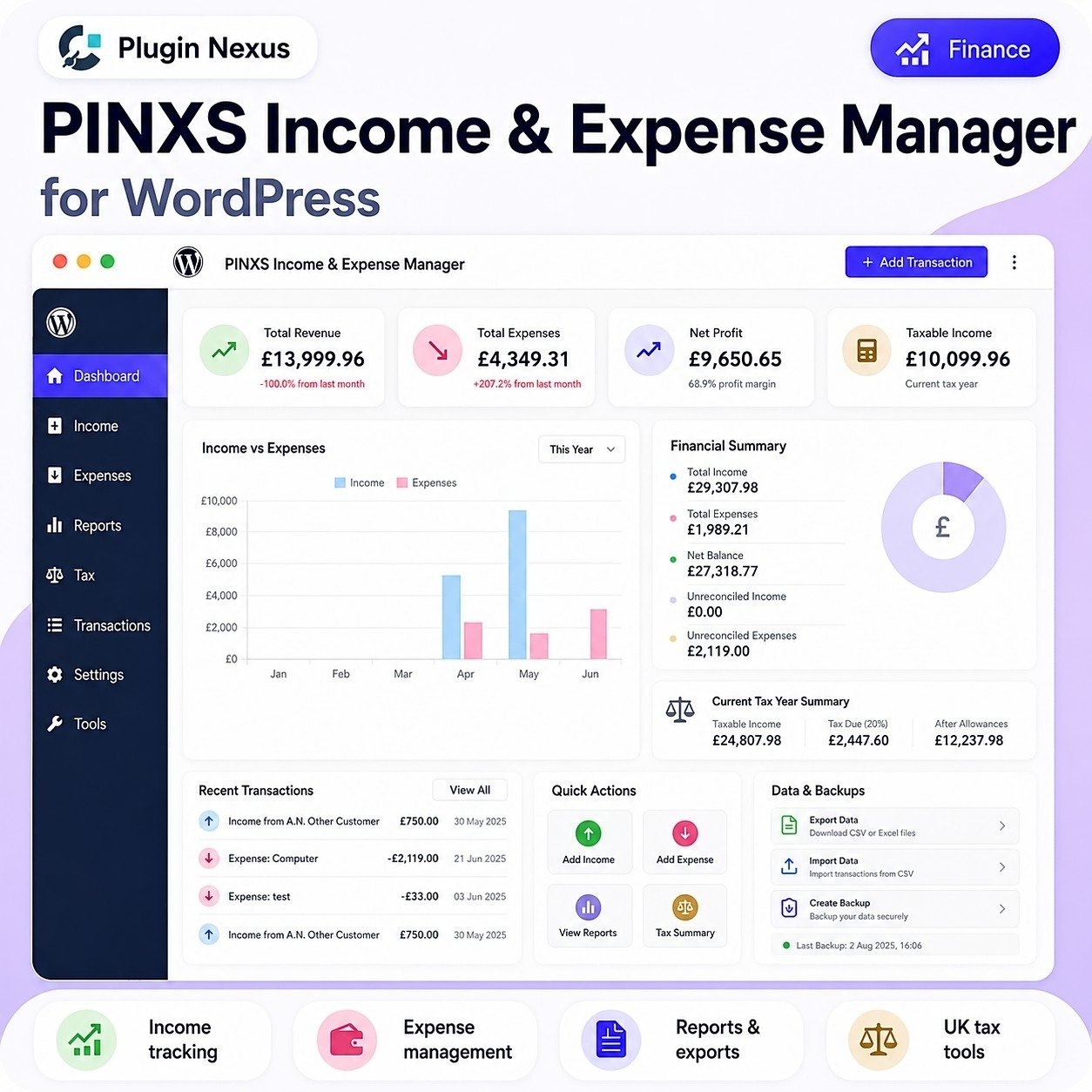
  • Summary cards for key finance figures.
  • Total revenue overview.
  • Total expenses overview.
  • Net profit calculation.
  • Taxable income summary.
  • Recent transaction list.
  • Quick action buttons for adding income or expenses.
  • Visual finance charts for income versus expenses.
  • Financial summary panel showing overall balance information.
  • Backup and export status area.

Income Tracking

  • Add income transactions manually.
  • Record income source or customer name.
  • Add transaction amount and date.
  • Add description or reference details.
  • Mark income as business-related where required.
  • View income history in date order.
  • Edit incorrect income entries.
  • Delete income entries no longer required.
  • Include income in reports and taxable summaries.

Expense Management

  • Add expense transactions manually.
  • Record supplier, vendor or expense description.
  • Add expense amount and transaction date.
  • Categorise expenses for clearer reporting.
  • Mark expenses as business expenses when applicable.
  • Business expense checkbox can be left unchecked by default so the user must choose it intentionally.
  • View all expense entries in the expenses table.
  • Edit or delete expense entries when needed.
  • Sort expenses with latest dates at the top.

Transaction Management

  • View income and expenses in a transaction list.
  • Search or review recorded transactions.
  • See transaction type, date, amount and description.
  • Keep a full working record of financial activity.
  • Edit saved transactions.
  • Delete saved transactions.
  • Maintain cleaner records by correcting mistakes without recreating everything.
  • Use transaction records as the base for reports, summaries and tax tools.

Scheduled One-Time Transactions

  • Add scheduled one-time transactions for future or planned finance entries.
  • View scheduled one-time transactions in the balance sheet area.
  • Edit scheduled transactions if the amount, date or description is wrong.
  • Delete scheduled transactions if they are no longer needed.
  • Helps keep planned income or expenses visible before they become normal records.

Reports and Summaries

  • Generate finance summaries from saved transaction data.
  • Compare income against expenses.
  • Review net balance.
  • View total income and total expenses.
  • Review taxable income figures.
  • Use charts to understand business performance.
  • Export report data for external review or record keeping.
  • Useful for monthly, yearly or business-period checks.

Tax Tools

  • Calculate taxable income based on recorded business data.
  • Display estimated tax due where configured.
  • Separate taxable values from general income and expense totals.
  • Helps prepare figures for accountant review.
  • Supports a UK-focused tax summary style.
  • Shows tax-related figures in a simple admin dashboard format.
  • Useful as a record-keeping aid rather than a replacement for professional tax advice.

Data Import and Export

  • Export financial data to CSV or Excel-style formats.
  • Use exports for backups, accountant handover or offline review.
  • Import transaction data from CSV where supported.
  • Helps migrate existing records into the plugin.
  • Allows external cleanup or review of data before re-importing.
  • Keeps records portable rather than locked into the site only.

Backup Tools

  • Create backups of plugin finance data.
  • Keep a dated record of backup activity.
  • Restore or preserve data before major changes where supported.
  • Recommended before plugin updates, site migration or large data edits.
  • Helps reduce risk when managing important finance records.

Security and Data Protection

  • Finance data remains inside the WordPress installation.
  • No external SaaS finance platform required for normal use.
  • Sensitive records should be protected by strong WordPress admin security.
  • Administrator-only access should be used for finance screens.
  • Site backups should be kept secure.
  • If encryption or passphrase features are enabled, the passphrase should be stored safely.
  • Users should avoid sharing admin access with anyone who does not need financial information.

Plugin Nexus Integration

  • Designed to work alongside compatible Plugin Nexus products where supported.
  • Can listen for PINXS Member Manager transaction events when both plugins are installed and integration is enabled.
  • Can receive provider-aware transaction details from Member Manager, including Stripe, PayPal, test/setup payments and compatible future provider data.
  • Can create income records for completed paid membership transactions automatically.
  • Can create business expense records for refunds processed through Member Manager.
  • Helps keep income, refund and payment-source records more consistent across connected Plugin Nexus products.

WooCommerce / Business Use

  • Suitable for tracking income from WooCommerce or digital product sales manually.
  • Useful alongside Plugin Nexus licence sales, software products and support services.
  • Can record software sales income, business expenses, hosting costs, plugin costs, equipment costs and service income.
  • Helps website owners keep a business-focused finance log inside WordPress.

Automated Record Keeping with PINXS Member Manager

PINXS Income & Expense Manager becomes even more powerful when used with PINXS Member Manager. Instead of manually copying membership payments into your accounts, the two plugins can communicate inside WordPress so that payment and refund activity is recorded automatically when the integration is enabled.

  • Automatically records completed Member Manager payments as income entries.
  • Automatically records Member Manager refunds as business expense entries.
  • Stores useful transaction references such as payment ID, subscription ID, customer name, customer email and product or membership name.
  • Marks payment-processor transactions as reconciled because they originate from the connected payment event.
  • Uses clear tags such as member_manager and member_manager_refund so automated records are easier to identify later.
  • Supports provider-aware records, helping Stripe, PayPal, test/setup and compatible provider events appear under the correct payment source rather than being forced into one generic source.
  • Reduces repeated admin work because membership income and refunds do not need to be typed into the finance records again by hand.
  • Includes integration test tools in Member Manager so site owners can simulate payment and refund events and confirm that Income & Expense records are being created correctly.

Useful Across Multiple WordPress Sites

A single-site licence is ideal for one business website, but many WordPress site owners run more than one project. The 3 Site and Unlimited Site licence options are especially useful when each website needs its own local income, expense, refund and reporting records.

  • Install the plugin on each relevant WordPress site so that site can maintain its own transaction records.
  • Keep records separated by website, business area, client project, membership site or product brand.
  • Use it on a main business site, a membership site, a digital product store, a training site or multiple client-facing projects.
  • Pair it with PINXS Member Manager on membership websites to reduce manual payment and refund record entry.
  • Choose a 3 Site licence for a small group of related websites.
  • Choose an Unlimited Site licence if you manage many WordPress sites, build projects regularly or want the flexibility to use the plugin wherever your business records need to be tracked.

Typical User Workflow

Open the Income & Expense Manager dashboard.
Review current totals and recent activity.
Add income manually, or let Member Manager create income records automatically for completed membership payments.
Add expenses manually, or let Member Manager create refund expense records automatically when refunds are processed.
Check whether the transaction is business-related.
Review reports at the end of each month.
Export or back up records regularly.
Correct mistakes using edit/delete tools rather than duplicating entries.

Practical Benefits

  • Simple finance tracking without needing a complex accounting suite.
  • Keeps records close to the WordPress business website.
  • Reduces dependence on spreadsheets for basic income and expense logging.
  • Gives quick visibility of income, expenses and profit.
  • Reduces manual transaction entry when used with PINXS Member Manager for membership payments and refunds.
  • Helps prepare cleaner figures for accountant review.
  • Useful for small business owners who want a practical internal finance log.

Suggested Website/Product Page Feature Blocks

Income tracking
Expense management
Transaction records
Scheduled transactions
Reports and exports
UK tax tools
Data backup
CSV import
Business expense marking
Member Manager integration
Automatic membership income records
Automatic refund expense records
Multi-site licence friendly
WordPress admin dashboard
Self-hosted records
No SaaS finance subscription required

Additional information

Licence Type

Single Site, 3 Sites, Unlimited Sites

Built for serious WordPress sites

Clean, focused software made for performance, security, and practical site management.

  • Fast installation and clear setup flow
  • Regular updates and maintainable code
  • Designed to work with WooCommerce stores
  • Support and documentation friendly

Compatibility

VersionV1.8.82
Tested up toV7.0
Requires WP6.0+
Requires PHP7.4+ recommended, tested on PHP 8.3
HTMLHTML5
CSSCSS3
Download size75KB
LicenceLifetime licence
SupportLifetime support
Updates12 months
WooCommerceCompatible
Last updated2026-06-06
Single Site

Ideal for one website

Use on one live WordPress site. Ideal for a single business website, WooCommerce shop, portfolio, product page, or client project where only one activation is needed.

Multi Site

Great for client work

Choose this option if you manage several websites or need to use the plugin on more than one WordPress install. A good fit for freelancers, small studios, or businesses with multiple product sites.

Unlimited

Best for agencies, developers, and repeat projects

The unlimited licence is designed for people building multiple websites, client stores, product catalogues, or bundled services. It gives you more flexibility when using the plugin across a wider range of projects.

Leave a review

Be the first to review this product.

Reviews

There are no reviews yet.

Only logged in customers who have purchased this product may leave a review.

Ready to get started?

Choose your licence and complete your purchase securely.

Choose Licence & Buy Now
PINXS Ai Chatbot
Contact Page