VersionV1.0.23
Last updated2026-06-07
SupportLifetime support
Updates12 months

PINXS Membership Manager

Price range: £39.99 through £197.00

PINXS Membership Manager is a Plugin Nexus WordPress membership plugin for creating free and paid member areas, protecting content, managing member downloads and taking payments through Stripe, PayPal, or both.

It gives you a practical way to sell premium access, digital resources, subscriptions, protected downloads, courses, private content and member-only areas directly from your WordPress site. Instead of piecing together separate tools, you can manage members, access levels, payment options, protected content and customer-facing membership pages from one plugin.

Ideal for digital product sellers, course creators, membership sites, agencies, consultants, software sellers and businesses that want a flexible WordPress membership system with built-in payment and content protection features.

Includes: Lifetime licence, lifetime support, 12 months updates.

Description

WordPress Membership, Payments & Protected Content
PINXS Membership Manager
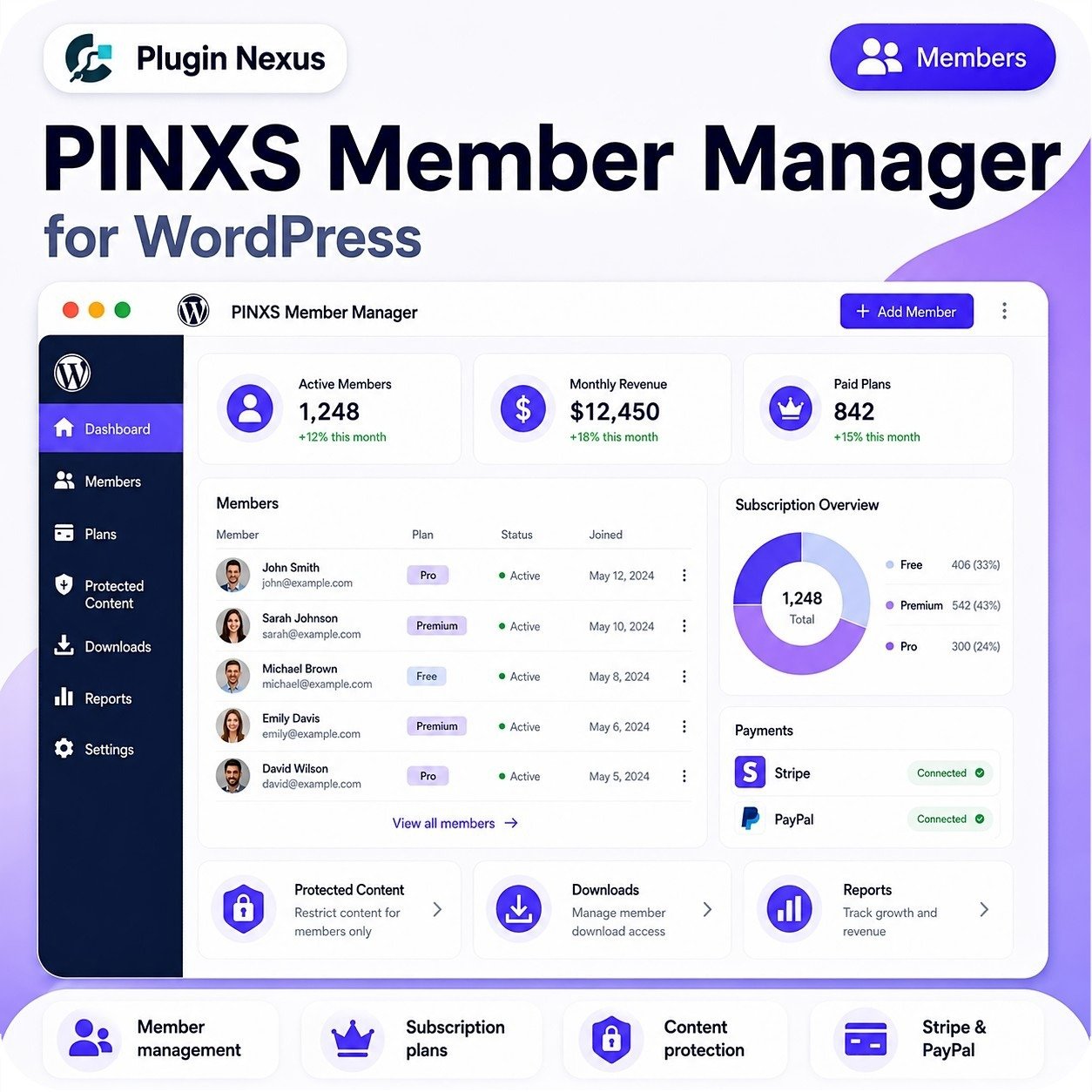
Dashboard
Members
Plans
Protected Content
Downloads
Reports
Settings
Active Members
1,248
+12% this month
Monthly Revenue
£12,450
+18% this month
Paid Plans
842
+15% this month
Members
John SmithProActive
Sarah JohnsonPremiumActive
Michael BrownFreeActive
Emily DavisPremiumActive

Plan Overview

1,248

Payments

Stripe — ConnectedPayPal — Connected
Membership levels
Create free, paid and premium membership levels with role-based access control.
Payments and downloads
Accept Stripe and PayPal payments, protect files and give members controlled download access.

WordPress Membership Manager Plugin

Build a complete membership website inside WordPress

PINXS Membership Manager helps you sell subscriptions, manage members, protect content, control downloads and create member-only areas directly from your WordPress admin dashboard.

Use it to create free and paid membership tiers, accept Stripe and PayPal payments, protect pages, posts, Elementor sections and downloadable files, and give users a cleaner membership experience without building a custom system from scratch.

Free & paid tiers
Stripe payments
PayPal payments
Protected content
Member downloads
Elementor ready

👥

Manage members with confidence

View, add, edit and manage members from a dedicated admin area, including membership level, account details and access status.

🔒

Protect valuable content

Restrict access to pages, posts, Elementor sections, premium resources and downloadable files based on membership level.

💳

Take payments online

Connect Stripe and PayPal to sell subscriptions, handle paid access and support payment provider webhooks.

How it works

Create a structured membership experience using familiar WordPress tools.

1. Set up your free, paid and premium membership levels
2. Connect Stripe and PayPal payment settings
3. Protect pages, downloads and Elementor content
4. Let members sign up, access content and manage subscriptions

Why use a membership plugin?

Membership websites need more than a payment button. You need access rules, account pages, protected downloads and member administration working together.

Sell access
Protect files
Manage users
Track access
Reduce admin
Grow revenue

PINXS Membership Manager vs Manual Membership Setup

Create a more professional member experience without stitching together pages, roles, downloads and payment flows by hand.

Member access
Plugin: Level basedManual: Harder
Payment flow
Plugin: IntegratedManual: Fragmented
Downloads
Plugin: ProtectedManual: Risky
Elementor content
Plugin: Section rulesManual: Limited
Member admin
Plugin: CentralisedManual: Time-heavy
Best use case
Plugin: Growing sitesManual: Tiny sites
Member experience
Plugin: PolishedManual: Inconsistent
Scaling workload
Plugin: EasierManual: More admin
Use PINXS Membership Manager when you want to sell access, protect digital resources and manage your members from one WordPress-focused system.

Create member-only content, downloads and paid plans

PINXS Membership Manager brings the key membership-site tools together: free and paid tiers, protected content, member downloads, payment provider setup, account pages, shortcodes and Elementor-friendly access controls.

👥 MembersManage free and paid users.
🔒 ProtectionRestrict pages and content.
📥 DownloadsControl member resources.
💳 PaymentsStripe and PayPal ready.

Key features

👥

Member administrationView and manage members, membership roles, access levels and account details from the admin dashboard.

💳

Stripe & PayPal supportConnect payment providers to sell paid memberships and support subscription-style workflows.

🔐

Content gatingRestrict pages, posts and content blocks to free members, paid members or higher-level plans.

📥

Protected downloadsUpload files, organise downloads and control which membership levels can access each resource.

🧩

Elementor integrationUse membership widgets and section protection tools directly inside Elementor layouts.

🔘

Subscription buttonsAdd membership signup and subscription purchase buttons to pages, posts and landing pages.

📋

Useful shortcodesUse shortcodes for member-only content, free member content, download buttons, member info and account links.

🚀

WordPress nativeBuilt for WordPress workflows, admin screens, roles, pages, posts and standard site management.

Who is it for?

🎓

Course creatorsProtect lessons, resources and member-only pages for students and subscribers.

📚

Digital product sellersSell controlled download access to files, templates, PDFs, resources and premium content.

🧑‍🤝‍🧑

Community websitesCreate member areas, free signups and premium communities with controlled access.

💼

AgenciesBuild membership and paid content areas for client sites without custom development.

🛒

WooCommerce-style sellersAdd membership access and protected resources alongside your existing product or service offers.

🚀

SaaS & software sitesRestrict downloads, documentation, account resources and support areas to active members.

📰

Premium publishersPut articles, guides, reports and private resources behind free or paid membership access.

🧰

Resource library ownersCreate organised member-only libraries for files, templates, downloads and support materials.

Perfect for WordPress membership sites

Use PINXS Membership Manager to organise the core parts of a membership website: user access, payments, downloads, protected content and member-facing pages.

✓ Free member areas
✓ Paid memberships
✓ Premium content libraries
✓ Protected downloads
✓ Elementor layouts
✓ Member account pages

🛡️

You control access

Choose who can view specific content, who can download files and which membership level is required for each area of the site.

⚙️

Flexible setup

Use shortcodes, widgets, section protection and admin settings to build the membership flow that fits your website.

📨

Member communication

Use membership-related email templates and payment notifications to keep members informed after signup or purchase.

Built-in shortcodes for real site workflows

Add membership features wherever you need them using simple WordPress shortcodes.

[members_only]Restrict content to paid members or selected membership levels.
[free_members]Show content to registered free and paid members.
[member_download]Create protected download buttons for member-only files.
[downloads_list]Display available downloads in list or grid layouts.
[member_info]Show logged-in member details such as name, email, level or dates.
[subscription_details]Display the current member’s subscription details on account pages.
[account_link]Add account page links for profiles, subscriptions, billing and member dashboards.
[fmm_free_signup]Create a free member registration form for lead magnets, communities and starter access.

Turn WordPress into a member-powered platform

PINXS Membership Manager gives you the tools to sell access, protect content, organise members and deliver digital resources from one WordPress plugin.

Free & paid membershipsStripe & PayPalProtected downloadsElementor ready

Licence and support

Includes: Lifetime licence, lifetime support, 12 months updates. You can keep using the plugin for the lifetime of your site, with ongoing support included and update access for the first 12 months.
WordPress Membership Manager

PINXS Member Manager Features

PINXS Member Manager helps you create and manage a membership system directly inside WordPress, with free or paid plans, protected content, member downloads, payment connections and member activity reporting.

It is designed for customer portals, private resource areas, software downloads, digital product access, documentation libraries, training content and membership-based WordPress websites without needing to depend on an external SaaS membership platform.

Core Purpose

  • Create and manage a membership system inside WordPress.
  • Build free or paid membership plans.
  • Restrict protected content to selected members or plans.
  • Manage member records from WordPress admin.
  • Connect payments through Stripe and PayPal where configured.
  • Provide downloadable files or protected resources to members.
  • Track membership activity, revenue and member status.
  • Avoid depending on an external SaaS membership platform.

Member Management

  • View all members from a central admin area.
  • Add new members manually.
  • Review member name, email, plan, status and joined date.
  • Edit member details when required.
  • Activate or deactivate members.
  • Assign members to free, premium or pro-style plans.
  • Search and review member records.
  • Track active members.
  • View membership status at a glance.
  • Manage access without needing to edit WordPress users manually every time.

Membership Plans

  • Create multiple membership plans.
  • Support free plans.
  • Support paid plans.
  • Define plan names and descriptions.
  • Set pricing for each plan.
  • Configure access level per plan.
  • Use plans to control which content or downloads members can access.
  • Upgrade or move users between plans where required.
  • Keep plan structure simple for customers and site administrators.

Subscription Management

  • Manage recurring or plan-based member access.
  • View subscription status.
  • Track active, inactive, free, premium and pro members.
  • See subscription overview charts.
  • Monitor membership distribution across plans.
  • Review paid plan totals.
  • Track monthly membership revenue.
  • Use subscription data to understand growth and retention.

Protected Content

  • Restrict WordPress pages, posts or selected content areas.
  • Make content available only to logged-in members.
  • Restrict content by membership plan.
  • Protect premium resources, tutorials, documentation or private pages.
  • Display content only to members with the correct access level.
  • Prevent non-members from viewing restricted material.
  • Useful for courses, customer portals, digital product resources and private member areas.

Downloads and Digital Resources

  • Provide protected downloads to members.
  • Control access to downloadable files based on membership plan.
  • Use downloads for software files, templates, documents, resources or customer assets.
  • Keep member downloads separate from public website content.
  • Allow paid members to access premium files.
  • Manage download availability from the WordPress admin area.

Payments

  • Stripe payment support where configured.
  • PayPal payment support where configured.
  • View payment connection status.
  • Support paid membership plan sales.
  • Track payment-related member activity.
  • Useful for selling premium access, subscription plans or private digital content.
  • Keep the membership sales flow connected to the WordPress site.

Dashboard Overview

  • Active members summary.
  • Monthly revenue summary.
  • Paid plans summary.
  • Membership growth indicators.
  • Subscription overview chart.
  • Payments connection panel.
  • Quick access cards for protected content, downloads and reports.
  • At-a-glance view of membership activity.
  • Simple admin layout for site owners and support staff.

Reports and Analytics

  • Track member growth.
  • Review active member count.
  • Monitor paid plan totals.
  • Review monthly revenue.
  • View plan distribution.
  • Identify free versus paid member split.
  • Use reports to understand membership performance.
  • Helps with business planning and customer retention.

Access Control

  • Control what members can view.
  • Control what files members can download.
  • Limit premium content to selected plans.
  • Keep non-members away from restricted areas.
  • Use plan-based access to create clear upgrade paths.
  • Useful for private documentation, support resources and paid content libraries.

WordPress Admin Workflow

Manage members from inside WordPress.
Add or edit membership plans from the plugin area.
Review members and their assigned plan.
Protect pages or resources.
Connect payment providers.
Test member access from a normal user account.
Review reports regularly.
Keep member records updated as plans change.

WooCommerce / Product Sales Use

  • Can support software or digital product businesses.
  • Useful for customer-only resource areas.
  • Can be paired with Plugin Nexus licence/download workflows where needed.
  • Helps provide members with private access after purchase.
  • Suitable for product documentation, download areas, update information and support resources.

Customer Experience

  • Members can access protected content after logging in.
  • Paid members can receive access to premium areas.
  • Members can be grouped by plan.
  • Customers see only the resources relevant to their access level.
  • Simple membership structure helps reduce support questions.
  • Clear plan names make it easier for customers to understand what they have purchased.

Security and Administration

  • Keep membership tools restricted to trusted administrators.
  • Avoid giving untrusted users access to member management screens.
  • Protect payment settings and member records.
  • Use strong WordPress administrator passwords.
  • Keep WordPress, themes and plugins updated.
  • Back up the site before major changes.
  • Test access rules before launching protected content publicly.

Practical Use Cases

Paid members area
Free members area
Customer portal
Software customer downloads
Private documentation library
Course or training resource area
Support resource hub
Premium blog or content archive
Client-only resource area
Digital product access control

Suggested Website/Product Page Feature Blocks

Member management
Subscription plans
Protected content
Stripe and PayPal payments
Member downloads
Revenue tracking
Plan-based access
Reports and analytics
Free and paid memberships
WordPress admin dashboard
Customer resource portal
No SaaS membership platform required

Additional information

Licence Type

Single Site, 3 Sites, Unlimited Sites

Built for serious WordPress sites

Clean, focused software made for performance, security, and practical site management.

  • Fast installation and clear setup flow
  • Regular updates and maintainable code
  • Designed to work with WooCommerce stores
  • Support and documentation friendly

Compatibility

VersionV1.0.23
Tested up toV7.0
Requires WP6.0+
Requires PHP7.4+ recommended, tested on PHP 8.3
HTMLHTML5
CSSCSS3
Download size2.13MB
LicenceLifetime licence
SupportLifetime support
Updates12 months
WooCommerceCompatible
Last updated2026-06-07
Single Site

Ideal for one website

Use on one live WordPress site. Ideal for a single business website, WooCommerce shop, portfolio, product page, or client project where only one activation is needed.

Multi Site

Great for client work

Choose this option if you manage several websites or need to use the plugin on more than one WordPress install. A good fit for freelancers, small studios, or businesses with multiple product sites.

Unlimited

Best for agencies, developers, and repeat projects

The unlimited licence is designed for people building multiple websites, client stores, product catalogues, or bundled services. It gives you more flexibility when using the plugin across a wider range of projects.

Leave a review

Be the first to review this product.

Reviews

There are no reviews yet.

Only logged in customers who have purchased this product may leave a review.

Ready to get started?

Choose your licence and complete your purchase securely.

Choose Licence & Buy Now
PINXS Ai Chatbot
Contact Page