VersionV3.1.66
Last updated2026-06-07
SupportLifetime support
Updates12 months

PINXS Schema Pro

Price range: £19.97 through £197.00

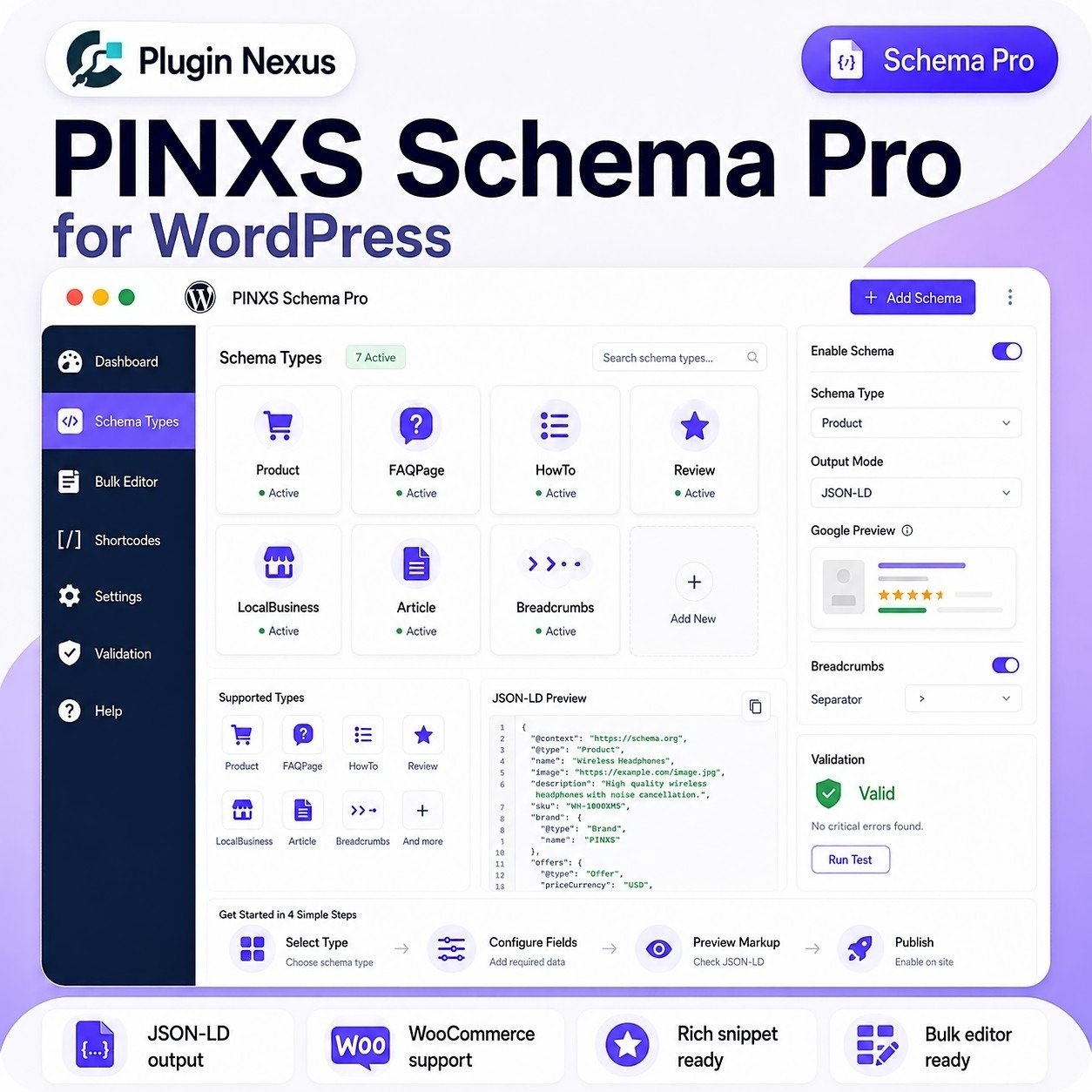
Improve your WordPress structured data with PINXS Schema Pro — a powerful schema markup plugin for adding clean JSON-LD output to posts, pages, WooCommerce products, FAQs, HowTo guides, reviews, services and local business content.

Perfect for WooCommerce stores, bloggers, agencies, local businesses and WordPress developers who want better schema control without manually writing JSON-LD code.

✓ JSON-LD structured data output
✓ WooCommerce Product schema support
✓ FAQPage, HowTo, Review, Article and LocalBusiness schema
✓ Bulk schema editor for faster site-wide management
✓ Google-style preview and validation workflow
✓ Duplicate schema control for cleaner output

Add professional schema markup to your WordPress site with a clean, flexible and WordPress-native workflow.

SKU: PINXS-schm-pro-plg Category:

Description

WordPress JSON-LD Schema Plugin

Add professional Schema markup to WordPress

PINXS Schema Pro helps you generate clean JSON-LD structured data for WordPress pages, posts, WooCommerce products, FAQs, HowTo content, services, reviews, local businesses, breadcrumbs and website search.

Built for site owners, agencies, developers and digital product sellers who want better structured data control without manually writing schema code for every page.

JSON-LD output
WooCommerce Product schema
FAQ & HowTo builders
Bulk editor
Google preview
Duplicate schema control

🔎

Better structured data

Output clean Schema.org JSON-LD markup to help search engines understand your WordPress content more clearly.

⚙️

Global and per-page control

Set schema defaults globally, then override or refine schema types on individual posts, pages and products.

🧩

Built for real websites

Includes practical schema types for content sites, WooCommerce stores, service businesses, FAQs, reviews and local business pages.

How it works

Configure schema once, then fine-tune it where needed using WordPress-native settings.

1. Set your global schema options
2. Map schema types to post types
3. Add FAQ, HowTo, Product, Review, Service or LocalBusiness data
4. Preview your JSON-LD before publishing

Schema types included

Add structured data for the content types your site actually uses.

Product
FAQPage
HowTo
Review
Service
LocalBusiness
Article
BreadcrumbList

Live Plugin Demo Available

View the PINXS Schema Pro demo

Explore the public PINXS Schema Pro demo to see example schema output, real metabox screenshots and prepared demo content for posts, pages and WooCommerce products. This helps show how structured data can be managed from inside WordPress.

The admin demo is read-only, so visitors can view Schema Pro settings, schema previews and metaboxes without being able to save, delete, upload or change stored demo data.

PINXS Schema Pro vs Manual Schema Markup

Save time, reduce mistakes and manage structured data from inside WordPress.

Setup speed
Plugin: Fast
Manual: Slow
Bulk editing
Plugin: Yes
Manual: No
WooCommerce data
Plugin: Integrated
Manual: Repeated
Duplicate control
Plugin: Managed
Manual: Risky
Ongoing maintenance
Plugin: Easier
Manual: Time-consuming
Consistency across pages
Plugin: Consistent
Manual: Variable
Preview workflow
Plugin: Built in
Manual: External tools
Human error risk
Plugin: Lower
Manual: Higher
Use PINXS Schema Pro when you want practical schema automation with the flexibility to control what appears globally, per post type and per individual page.

Key features

🧠

Smart JSON-LD generation
Outputs structured data in modern JSON-LD format using WordPress content and configured schema fields.

🛒

WooCommerce Product schema
Use product titles, images, descriptions, SKU, price, currency, stock status and product data where available.

FAQPage builder
Add structured FAQ question and answer data for pages where FAQ content is visible.

🛠️

HowTo schema builder
Create HowTo structured data with steps, tools, supplies and practical instructional content.

🏢

LocalBusiness support
Add business name, address, telephone, opening hours, geo and service-area style structured data.

🧾

Bulk schema editor
Search, filter and manage schema settings across multiple posts, pages and products more efficiently.

👁️

Google listing preview
Preview how title and description information may appear before publishing or updating content.

🔒

Safe output controls
Omit empty fields, prune empty objects and avoid outputting misleading structured data.

Who is it for?

🛒

WooCommerce stores
Improve product structured data using WooCommerce product details.

✍️

Bloggers & publishers
Add Article, BlogPosting, WebPage and breadcrumb schema to content-heavy websites.

🏢

Local businesses
Add LocalBusiness and Service schema for real business pages and service areas.

💼

Agencies
Manage schema across multiple client sites with consistent, repeatable workflows.

🎓

Training & tutorial sites
Use HowTo and FAQ schema for guides, lessons, tutorials and support content.

💻

Software product sites
Add structured data to product pages, documentation pages, FAQs and comparison content.

📈

SEO consultants
Useful for improving structured data workflows and giving clients clearer schema implementation.

🧑‍💻

WordPress developers
Add schema capability to client websites without writing custom JSON-LD templates each time.

Perfect for WordPress structured data

Use PINXS Schema Pro to add richer machine-readable context to important pages across your website.

✓ Product pages
✓ Blog posts
✓ FAQ sections
✓ How-to guides
✓ Service pages
✓ Local business pages

🔒

Secure and controlled

Built with practical WordPress admin controls and safety rules to avoid empty, fake or misleading structured data output.

🧩

Flexible schema mapping

Assign schema types by post type, then add or remove schema types on individual posts, pages or products.

Choose your licence

Each licence includes the plugin download, lifetime licence, lifetime support and 12 months updates.

Starter
1 Site Licence — £39.99

Perfect for one WordPress website, personal project, business site or WooCommerce store.

Growth
3 Site Licence — £97.00

Ideal for users managing several websites, client projects or a small portfolio of WordPress sites.

Best for agencies
Unlimited Sites — £197.00

Best for agencies, developers and high-volume WordPress users managing many websites.

Frequently asked questions

Do all licence levels include the same features?
Yes. The only difference is how many websites you can activate.
Does it work with WooCommerce?
Yes. PINXS Schema Pro includes Product schema support and can use WooCommerce product data where available.
Can I control schema per page?
Yes. You can use global defaults and also override schema settings on individual posts, pages and products.
Does it help prevent duplicate schema?
Yes. It includes duplicate control options for situations where SEO plugins may already output some schema types.
Do I get updates?
Yes. Each licence includes a lifetime licence, lifetime support and 12 months updates.

Give your WordPress content better structured data

Use PINXS Schema Pro to manage JSON-LD schema across posts, pages, products and service content with a professional WordPress-native workflow.

WordPress Schema Markup Plugin

PINXS Schema Pro Features

PINXS Schema Pro helps WordPress site owners add structured schema markup to pages, posts, products, business content and WooCommerce product pages without manually writing JSON-LD code.

It is designed for WooCommerce stores, software product websites, blogs, service businesses, review-style content, documentation pages and commercial websites that want cleaner structured data and better rich result readiness.

Core Purpose

  • Add structured schema markup to WordPress websites.
  • Help search engines better understand pages, posts, products and business content.
  • Generate JSON-LD schema without manually writing code.
  • Support richer search result eligibility where Google supports the schema type.
  • Manage schema settings from inside WordPress admin.
  • Useful for WooCommerce stores, product websites, blogs, service businesses, review-style content and software product pages.

Schema Generation

  • Automatically generates structured data for supported content types.
  • Outputs schema in JSON-LD format.
  • Adds schema to the page source for search engine crawlers.
  • Helps define what the page is about.
  • Reduces the need for manual schema coding.
  • Supports consistent schema output across multiple pages.
  • Lets site owners manage schema from WordPress settings rather than templates.

Product Schema

  • Add Product schema to WooCommerce product pages.
  • Include product name and description where available.
  • Include product image where available.
  • Include brand information.
  • Include SKU or identifier where supported.
  • Include offer data when a product has a price.
  • Include product page URL.
  • Helps WooCommerce products become eligible for product-related rich result features where search engines allow it.

WooCommerce Offer Support

  • Pull product price from WooCommerce.
  • Output currency value.
  • Output availability status.
  • Output product condition where configured.
  • Use the product URL as the offer URL.
  • Support products with normal WooCommerce pricing.
  • Helps avoid missing required offer data on product schema.
  • Useful for software products, digital products, affiliate-style product records and normal WooCommerce catalogue products.

Product Brand Handling

  • Add brand data to product schema.
  • Use a default brand where required.
  • Helps define the product publisher or manufacturer.
  • Avoids manually adding brand information to every product.
  • Useful for Plugin Nexus-style software products where the brand is consistent.
  • Helps keep product schema cleaner and more complete.

Duplicate Brand Protection

  • Designed to avoid duplicate brand fields in product schema.
  • Helps prevent Google Search Console errors caused by repeated brand output.
  • Keeps schema cleaner when more than one plugin, theme or WooCommerce setting may also add product data.
  • Useful when troubleshooting structured data validation issues.
  • Helps protect product rich result eligibility from invalid duplicate fields.

Review Schema Controls

  • Enable or disable review schema output where supported.
  • Avoid outputting review schema when the site does not collect genuine reviews.
  • Helps prevent invalid or misleading review markup.
  • Useful for sites that do not want to claim ratings or review data.
  • Allows product schema to be used without forcing review schema.
  • Helps avoid review or aggregateRating issues when reviews are not used.

Aggregate Rating Handling

  • Supports situations where product schema is used without aggregate ratings.
  • Helps avoid adding fake rating data.
  • Lets site owners decide whether review or rating data should be included.
  • Useful when Google Search Console reports advisory messages rather than required errors.
  • Helps keep markup honest and compliant with real site content.

Article / Blog Schema

  • Add structured data to blog posts.
  • Identify article title.
  • Identify author or publisher information where configured.
  • Include date information where available.
  • Include featured image where available.
  • Helps search engines understand editorial content.
  • Useful for tutorials, product updates, announcement posts and educational content.

Page Schema

  • Add structured data to standard WordPress pages.
  • Identify page title and description.
  • Support more consistent page metadata.
  • Useful for service pages, documentation pages, landing pages and information pages.
  • Can be used alongside normal SEO title and meta description plugins.

Organisation / Publisher Schema

  • Add organisation or publisher information.
  • Include business or site name.
  • Include logo where configured.
  • Include website URL.
  • Helps search engines connect content to the organisation behind the site.
  • Useful for brand trust and consistent structured data.
  • Suitable for business websites and product brands.

Local Business / Business Information

  • Add business-related schema where supported.
  • Include business name.
  • Include contact or website information where configured.
  • Include address or service information where appropriate.
  • Helps define the organisation behind the site.
  • Useful for service businesses and commercial websites.
  • Should only include accurate public business information.

FAQ Schema

  • Add FAQ-style structured data where supported.
  • Useful for pages with clear question-and-answer content.
  • Helps search engines understand common questions.
  • Can support richer search display where search engines allow FAQ enhancements.
  • Useful for product pages, documentation pages, pre-sales pages and support pages.
  • Best used only where the FAQ content is visible on the page.

Breadcrumb Schema

  • Add breadcrumb structured data where supported.
  • Helps define page hierarchy.
  • Useful for WooCommerce stores and category-based sites.
  • Helps search engines understand where a page sits within the website.
  • Can support breadcrumb-style display in search results.
  • Works best with clean site navigation and logical categories.

Default Settings

  • Configure default schema behaviour from WordPress admin.
  • Set default currency, availability, condition and brand.
  • Set publisher or organisation details.
  • Enable or disable schema types.
  • Apply consistent defaults across products, pages and posts.
  • Reduces manual setup for each item.

Per-Content Schema Workflow

  • Review schema output per content type.
  • Use defaults for most pages or products.
  • Adjust product data in WooCommerce where needed.
  • Check title, description, image and price values.
  • Validate important pages using schema testing tools.
  • Update content and recheck if Google Search Console reports an issue.
  • Keep schema aligned with the visible page content.

Admin Dashboard

  • Manage schema tools from WordPress admin.
  • Access global schema settings.
  • Configure product schema behaviour.
  • Configure business or publisher information.
  • Review schema options by content type.
  • Save site-wide defaults.
  • Keep structured data management inside WordPress rather than editing theme files.

Google Search Console Support

  • Helps resolve missing required schema data where correct settings are configured.
  • Useful for fixing product schema issues such as missing offer data.
  • Helps avoid invalid product rich result markup.
  • Can support troubleshooting duplicate fields.
  • Should be tested with Google Rich Results Test or Schema Markup Validator.
  • Search Console may take time to update after fixes are applied.
  • Errors should be checked on the live page source, not only inside WordPress admin.

Rich Result Readiness

  • Helps provide structured data needed for rich result eligibility.
  • Does not guarantee rich results, because search engines decide what to display.
  • Correct schema improves eligibility but does not force enhanced search display.
  • Content must still be accurate, visible and useful.
  • Product prices, ratings and business details should match the public page.
  • Best results come from clean content, good SEO and valid structured data together.

WooCommerce Store Use

  • Useful for software product stores.
  • Useful for physical product stores.
  • Useful for catalogue-style WooCommerce sites.
  • Helps products output structured Product and Offer data.
  • Supports better product understanding by search engines.
  • Helps reduce manual schema work across multiple products.
  • Works well where WooCommerce already holds product price, image and description data.

Software Product Site Use

  • Useful for Plugin Nexus-style WordPress plugin and theme products.
  • Add Product schema to digital software product pages.
  • Include lifetime licence, support and update messaging in visible product content, while schema uses structured product and offer fields.
  • Help search engines understand each plugin or theme as a product.
  • Useful for demo hub, documentation and product landing page ecosystems.
  • Keeps product structured data consistent across a software catalogue.

Validation and Testing

  • Test important pages after enabling schema.
  • Use Google Rich Results Test for supported rich result types.
  • Use Schema Markup Validator for general structured data checks.
  • Check page source if results are unexpected.
  • Clear cache before retesting if using caching plugins.
  • Check that only one active schema plugin is generating overlapping product schema.
  • Avoid running duplicate plugin versions at the same time.
  • Remove old duplicate installations before validating again.

Compatibility

  • Designed for WordPress websites.
  • Works with WooCommerce product data where enabled.
  • Can be used with most normal WordPress themes.
  • Should be checked if another SEO or schema plugin is also outputting the same schema type.
  • Works best when only one tool is responsible for each major schema type.
  • Caching plugins may need clearing after changing schema settings.

Data Accuracy

  • Schema should match the visible page content.
  • Product price should match WooCommerce price.
  • Availability should reflect the real product status.
  • Brand should be correct.
  • Review and rating data should only be output if genuine and supported.
  • Business details should be accurate.
  • Avoid adding structured data that misrepresents the page.

Troubleshooting

  • Clear cache after changing schema settings.
  • Re-save the product or page if schema data looks outdated.
  • Check that only one version of the plugin is active.
  • Check for other schema or SEO plugins creating duplicate output.
  • Validate the live public URL, not just the WordPress preview.
  • Confirm WooCommerce product has price and image where product schema requires them.
  • Confirm default currency and availability settings are correct.
  • Allow Google Search Console time to recrawl pages after fixes.

Admin and Security

  • Restrict schema settings to trusted administrators.
  • Back up the site before major plugin updates.
  • Keep WordPress, WooCommerce, the theme and plugins updated.
  • Avoid editing generated schema code manually unless instructed.
  • Keep plugin updates installed to benefit from fixes and compatibility improvements.
  • Do not run multiple active copies of the same plugin.

Practical Use Cases

WooCommerce product schema
Software product structured data
Blog article schema
Business website schema
FAQ page schema
Product documentation pages
Product landing pages
Catalogue websites
Affiliate-style product pages
Search Console troubleshooting

Suggested Website/Product Page Feature Blocks

Product schema
WooCommerce offer support
JSON-LD output
Brand handling
Review schema controls
FAQ schema
Article schema
Organisation schema
Breadcrumb schema
Google Search Console support
Rich result readiness
No manual schema coding required

Additional information

Licence Type

Single Site, 3 Sites, Unlimited Sites

Built for serious WordPress sites

Clean, focused software made for performance, security, and practical site management.

  • Fast installation and clear setup flow
  • Regular updates and maintainable code
  • Designed to work with WooCommerce stores
  • Support and documentation friendly

Compatibility

VersionV3.1.66
Tested up toV7.0
Requires WP6.0+
Requires PHP7.4+ recommended, tested on PHP 8.3
HTMLHTML5
CSSCSS3
Download size75KB
LicenceLifetime licence
SupportLifetime support
Updates12 months
WooCommerceCompatible
Last updated2026-06-07
Single Site

Ideal for one website

Use on one live WordPress site. Ideal for a single business website, WooCommerce shop, portfolio, product page, or client project where only one activation is needed.

Multi Site

Great for client work

Choose this option if you manage several websites or need to use the plugin on more than one WordPress install. A good fit for freelancers, small studios, or businesses with multiple product sites.

Unlimited

Best for agencies, developers, and repeat projects

The unlimited licence is designed for people building multiple websites, client stores, product catalogues, or bundled services. It gives you more flexibility when using the plugin across a wider range of projects.

Leave a review

Be the first to review this product.

Reviews

There are no reviews yet.

Only logged in customers who have purchased this product may leave a review.

Ready to get started?

Choose your licence and complete your purchase securely.

Choose Licence & Buy Now
PINXS Ai Chatbot
Contact Page