
Description
Add a smart AI support chatbot to WordPress
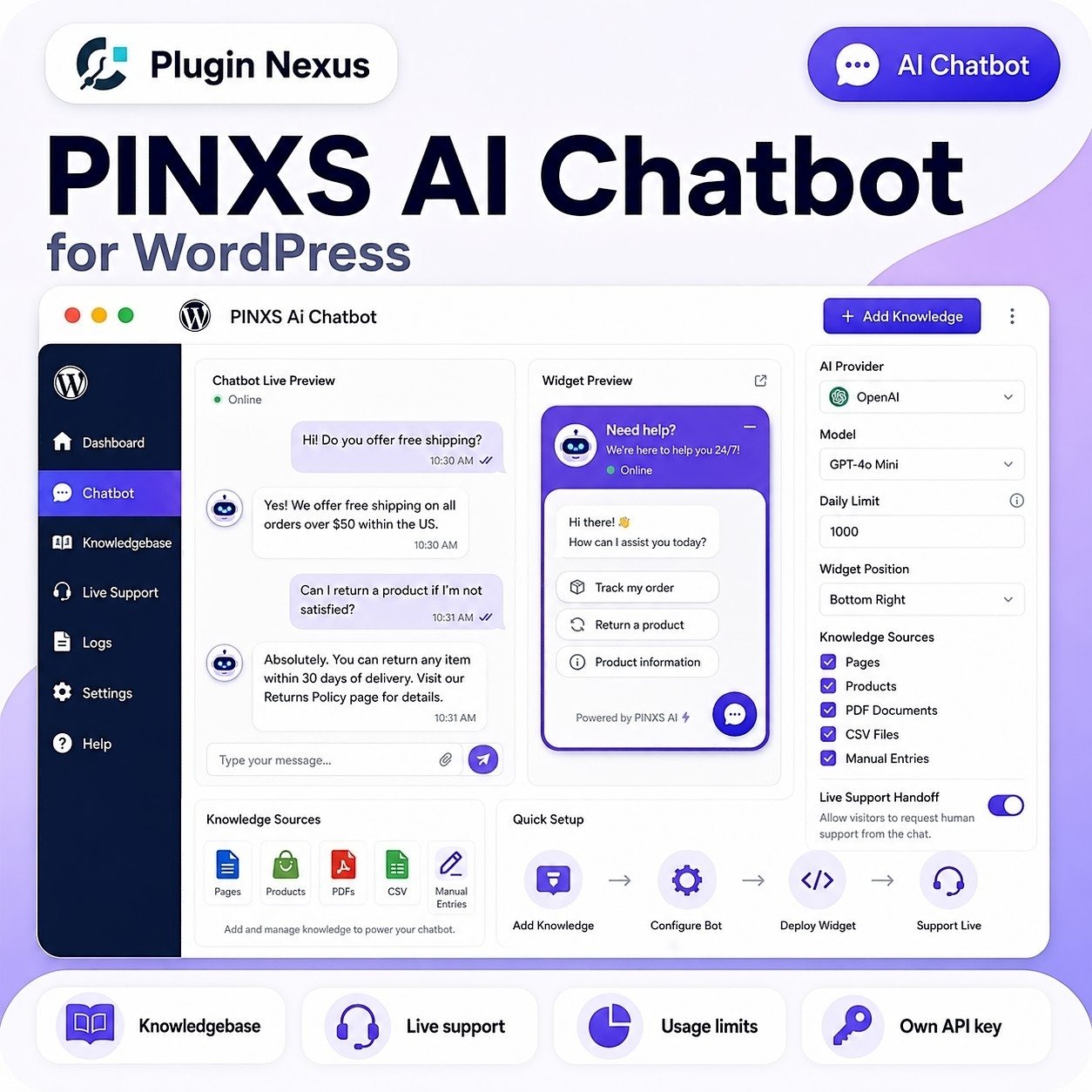
PINXS Ai Chatbot helps you provide instant website support using your own OpenAI API key and your own knowledgebase. Visitors can ask questions about your products, services, documentation, pages or support information directly from your website.
Build a practical AI assistant from WordPress content, WooCommerce products, manual knowledge entries, PDFs and CSV files, then control how it behaves with limits, fallback messages, transcript tools and optional human support takeover.
Knowledgebase powered
Floating chat widget
Live human takeover
Usage limits
WooCommerce paid access ready
AI website assistant
Let visitors ask questions and receive helpful answers based on your configured website knowledge.
Knowledgebase answers
Use pages, posts, WooCommerce products, PDFs, CSV files and manual entries as answer sources.
AI plus human support
Allow visitors to request human help and let an operator take over the conversation when needed.
How it works
Create a useful AI support assistant without paying for a separate chatbot SaaS platform.
Why use your own API key?
Your site connects directly to the AI provider through your own account, giving you more control and avoiding another monthly chatbot subscription layer.
Train the chatbot on your own website content
PINXS Ai Chatbot is designed to answer from the information you provide. Build a knowledgebase from existing WordPress content, product information, manual entries and uploaded files so the chatbot can respond with more relevant answers.
Hybrid AI and live human support
The chatbot can handle common questions automatically, while still allowing a human operator to take over when a visitor needs personal help. This makes it suitable for real support workflows, not just simple automated replies.
Online/offline support mode
Show visitors when live support is available or send them to the correct contact option.
Human takeover
Let an operator take control of a conversation when AI is not enough.
Transcript options
Allow users to request email transcripts with verification protection.
Control usage, access and cost
Because the chatbot uses your own API account, the plugin includes tools to help control usage and prevent unnecessary API spend.
Limit how many questions visitors can ask per day.
Monitor usage, visitor limits and chatbot activity.
Block abusive or unwanted users from continuing to use the chatbot.
Optionally connect chatbot access to a WooCommerce product or paid access workflow.
View Plugin Nexus demos
The Plugin Nexus demo hub is being built to provide safe live demos and read-only admin previews for selected products. As the main site and demo site grow, more plugin demos will be added.
Public demos may disable AI actions, email sending, editing, saving or deleting features to prevent abuse and protect the demo environment.
Key features
Floating chat widget
Add a chatbot button to your site so visitors can ask questions from normal pages.
Expert role prompt
Guide tone, role, answer style and boundaries with a dedicated instruction prompt.
Knowledgebase manager
Create, edit, import, rebuild, search and manage chatbot knowledge sources.
Transcript verification
Email transcript tools can use verification to reduce misuse and protect visitors.
Live human takeover
Allow a real operator to step into a conversation and support visitors directly.
Logs and usage visibility
Review conversations, monitor usage and export data where needed.
Who is it for?
WooCommerce stores
Answer common product, licence, download and pre-sales questions.
Documentation sites
Help visitors find answers from guides, FAQs, manuals and knowledgebase entries.
Service businesses
Provide fast first-line answers before a human support request is needed.
Training and education
Help learners ask questions about course material, resources or site content.
Software product sites
Use product pages, docs and manuals to support plugin, theme or app customers.
Demo and support hubs
Give visitors guided answers while still offering contact or live support paths.
Choose your licence
Choose the licence that matches how many websites you need to activate. Each option includes a lifetime licence, lifetime support and 12 months of updates.
Perfect for one website, one support hub or a single product/business site.
Ideal for freelancers, small teams or a few client/project websites.
Best for agencies, developers and businesses managing multiple websites.
Frequently asked questions
Yes. The difference is the number of websites you can activate.
Yes. The plugin is designed to use your own API key so you control the provider account, usage and cost.
Yes. You can configure usage limits to help control API usage and prevent abuse.
Yes. The plugin includes live human support workflow options so an operator can take over where appropriate.
Yes. The plugin can be used with WooCommerce paid-access workflows where you want chatbot access connected to a product or membership-style purchase.
Add smarter support to your WordPress website
Give visitors faster answers, guide them through your content and products, and offer live support when AI is not enough — all from inside WordPress.
Reviews
There are no reviews yet.